Webhook
透過 Webhook 連線強化 Zealy 的功能。
作者 louis, Fredrika, benjamin
本頁內容
當九種社群事件之一觸發時,Zealy webhook 會向您選擇的 URL 發送 HTTP POST,這些事件包括成員加入、任務領取成功或失敗、衝刺開始以及使用者被封鎖。每個承載資料都包含事件 id、類型、資料、毫秒時間戳記,以及用來證明請求真實性的密鑰。
基礎概念
Zealy 提供 webhook ,讓您能在資料建立或更新時接收 HTTP 推送通知。這讓您能在 Zealy 之上建構整合功能。您可以觸發 CI 建置、對任務資料進行計算,或在特定條件下發送訊息——任您發揮。
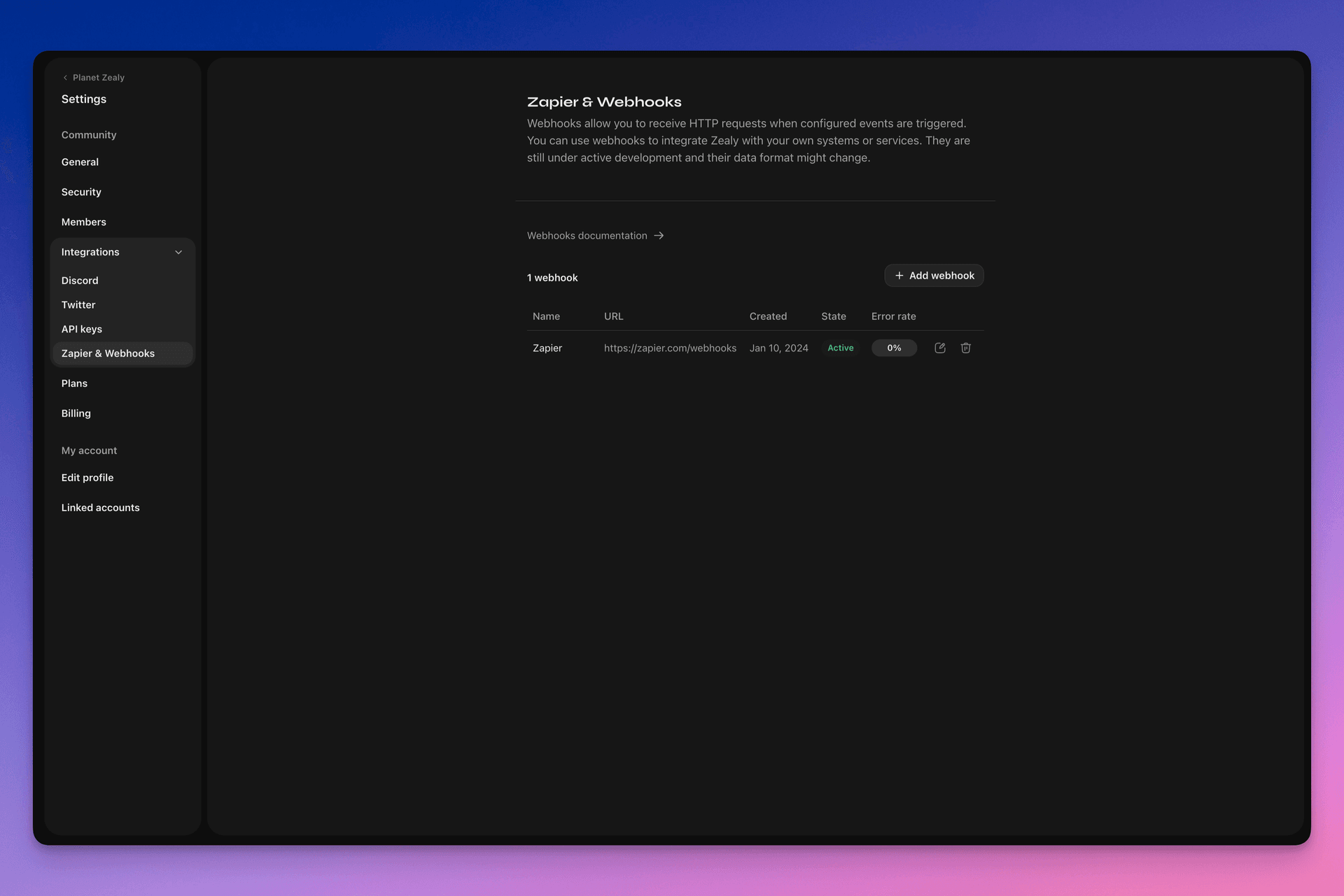
請前往設定 > 整合 > Zapier 與 Webhook 來設定您的 webhook。
Webhook 如何運作?
Webhook 推送就是一個 HTTP POST 請求,發送到您選擇的 URL。當資料更新時,推送會自動觸發。如需查看承載資料包含哪些內容的範例,請參閱 Webhook 承載資料.
您的 webhook 接收端是一個簡單的 HTTP 端點。它必須符合以下條件:
- 可透過公開存取的 HTTPS、非 localhost 的 URL 使用
- 會以
HTTP 200(「OK」)回應 Zealy Webhook 推送(HTTP POST 請求)
若傳送失敗(例如伺服器無法使用、回應時間超過 5 秒、回應內容大於 5000 位元組,或回應非 200 的 HTTP 狀態碼),推送將重試 15 次。此處採用指數退避延遲:約 10 分鐘後重試,接著 30 分鐘,依此類推。若 webhook URL 持續無回應,Zealy 可能會停用該 webhook,必須手動重新啟用。
為了確保 Webhook POST 確實由 Zealy 建立,我們會產生隨機密鑰,並附加到請求內容的 secret 欄位中。
如需更多 Webhook 相關資訊,有幾個不錯的資源:
- RequestBin:Webhook – 權威指南
- requestbin.com 是測試 webhook 的絕佳工具
- GitHub 開發者指南:Webhook
我可以拿它做什麼?
- 與 Zapier 整合
- 自動化自訂獎勵
- 在 Telegram 上通知待審核的任務
還有更多更多!
開始使用 Zealy Webhook
- 確認您想監控的事件。
- 開發一個 webhook 端點函式來接收事件資料的 POST 請求。
- 透過設定 > 整合 > Zapier 與 Webhook 中的 Webhook 儀錶板,在 Zealy 中註冊您的端點。
- 保護您的 webhook 端點。
建立簡單的 Webhook 接收端
您可以考慮使用 Netlify Functions 之類的服務,它提供部署簡單 HTTP(S) 端點的直觀方式: https://www.netlify.com/blog/2018/09/13/how-to-run-express.js-apps-with-netlify-functions/.
// server.js
//
// Use this sample code to handle webhook events in your integration.
//
// 1) Paste this code into a new file (server.js)
//
// 2) Install dependencies
//   npm install express
//
// 3) Run the server on http://localhost:4242
//   node server.js

// The library needs to be configured with your account's secret key.
// Ensure the key is kept out of any version control system you might be using.
const express = require('express');
const app = express();

// This is your Zealy webhook secret for testing your endpoint locally.
const endpointSecret = '5888a6800dbac634e52d8504f097e064';

app.post('/webhook', express.raw({ type: 'application/json' }), (request, response) => {
  const payload = req.body;
  // Does createdAt make more sense than time?
  const { id, type, data, time, secret } = payload;

  if (secret === endpointSecret) {
    // Do something neat with the data received!
  }

  // Return a 200 response to acknowledge receipt of the event
  response.send();
});

app.listen(4242, () => console.log('Running on port 4242'));
在設定中配置
在設定 > 整合 > Webhook 中設定 webhook 及其應監控的事件。
Webhook 承載資料
webhook HTTP 承載資料會同時在 HTTP 標頭和請求內容中包含資訊。
承載資料會隨以下 HTTP 標頭發送:
User-Agent: Zealy-Webhook
Content-Type: application/json; charset=utf-8
{
  id: string // unique ID for this event (UUID v4)
  type: "JOINED_COMMUNITY" | "LEFT_COMMUNITY" | "QUEST_SUCCEEDED" | "QUEST_CLAIMED" | "QUEST_FAILED" | "QUEST_CLAIM_STATUS_UPDATED" | "SPRINT_STARTED" | "SPRINT_ENDED" | "USER_BANNED", // event type
  data: EventData, // event data, see below
  time: number, // timestamp, in milliseconds
  secret: string, // secret generated when you created your webhook, used for checking origin
}
各事件的 EventData 欄位:
// JOINED_COMMUNITY
type JoinedCommunityEventData = {
  community: WebhookCommunityPayload;
  user: WebhookUserPayload;
};

// LEFT_COMMUNITY
type LeftCommunityEventData = {
  community: WebhookCommunityPayload;
  user: WebhookUserPayload;
};

// QUEST_SUCCEEDED
type QuestSucceededEventData = {
  community: WebhookCommunityPayload;
  user: WebhookUserPayload;
  quest: WebhookQuestPayload;
  taskInputs?: Array<{
    taskId: string, // task ID (uuid v4)
    taskType: 'number' | 'date' | 'api' | 'text' | 'discord' | 'url' | 'telegram' | 'quiz' | 'invites' | 'visitLink' | 'file' | 'poll' | 'opinion' | 'twitterFollow' | 'twitterSpace' | 'tweetReact' | 'tweet',
    input: WebhookQuestTaskInputPayload,
  }>;
  status: 'success';
};

// QUEST_CLAIMED
type QuestClaimedEventData = {
  community: WebhookCommunityPayload;
  user: WebhookUserPayload;
  quest: WebhookQuestPayload;
  taskInputs?: Array<{
    taskId: string, // task ID (uuid v4)
    taskType: 'number' | 'date' | 'api' | 'text' | 'discord' | 'url' | 'telegram' | 'quiz' | 'invites' | 'visitLink' | 'file' | 'poll' | 'opinion' | 'twitterFollow' | 'twitterSpace' | 'tweetReact' | 'tweet',
    input: WebhookQuestTaskInputPayload,
  }>;
};

// QUEST_FAILED
type QuestFailedEventData = {
  community: WebhookCommunityPayload;
  user: WebhookUserPayload;
  quest: WebhookQuestPayload;
  taskInputs?: Array<{
    taskId: string, // task ID (uuid v4)
    taskType: 'number' | 'date' | 'api' | 'text' | 'discord' | 'url' | 'telegram' | 'quiz' | 'invites' | 'visitLink' | 'file' | 'poll' | 'opinion' | 'twitterFollow' | 'twitterSpace' | 'tweetReact' | 'tweet',
    input: WebhookQuestTaskInputPayload,
  }>;
};

// QUEST_CLAIM_STATUS_UPDATED
type QuestClaimStatusUpdatedEventData = {
  community: WebhookCommunityPayload;
  user: WebhookUserPayload;
  quest: WebhookQuestPayload;
  taskInputs?: Array<{
    taskId: string, // task ID (uuid v4)
    taskType: 'number' | 'date' | 'api' | 'text' | 'discord' | 'url' | 'telegram' | 'quiz' | 'invites' | 'visitLink' | 'file' | 'poll' | 'opinion' | 'twitterFollow' | 'twitterSpace' | 'tweetReact' | 'tweet',
    input: WebhookQuestTaskInputPayload,
  }>;
  status: 'success' | 'pending' | 'failed';
};

// SPRINT_STARTED
type SprintStartedEventData = {
  community: WebhookCommunityPayload;
  sprint: WebhookSprintPayload;
};

// SPRINT_ENDED
type SprintEndedEventData = {
  community: WebhookCommunityPayload;
  sprint: WebhookSprintPayload;
};

// USER_BANNED
type UserBannedEventData = {
  community: WebhookCommunityPayload;
  user: WebhookUserPayload;
};
常見實體:
type WebhookCommunityPayload = {
  id: string; // community ID (uuid V4)
  name: string; // community name
  subdomain: string; // community subdomain
  blockchain: string;
  discord: string | null; // discord URI of the community, e.g., https://discord.gg/zealy
  twitter: string | null; // twitter handle of the community, e.g., zealy_io
  website: string | null; // website URI of the community
};
type WebhookUserPayload = {
id: string; // user ID (uuid V4)
name: string | null; // user display name
twitter: {
id: string; // user twitter ID
username: string | null; // user twitter handle
} | null;
discord: {
id: string; // user discord ID
handle: string | null; // user discord handle
} | null;
email: string | null; // user email
addresses: Dict<string>; // key/value dictionary for wallets
verifiedAddresses: Dict<string>; // key/value dictionary for all users verified wallets
};type WebhookQuestPayload = {
id: string; // quest ID (uuid V4)
name: string; // quest display name
categoryId: string; // category ID (uuid V4)
categoryName: string | null; // category display name
xp: number | null; // XP reward
published: boolean | null; // true if quest is published, false otherwise
autoValidate: boolean | null;
tasks: TaskPayload[];
lastReviewerId: string; // user ID (uuid V4)
};type WebhookQuestTaskInputPayload =
| { } // for task type 'visitLink', 'invites', 'discord', 'telegram', 'twitterFollow', 'twitterSpace'
| { value: string } // for task type 'text', 'date', 'url', 'opinion'
| { value: number } // for task type 'number'
| { values: string[] } // for task type 'poll', 'quiz'
| { fileUrls: string[] } // for task type 'fileUrls'
| { tweetId?: string } // for task type 'tweetReact', 'tweet'
| { requestId: string, statusCode: number } // for task type 'api'type WebhookSprintPayload = {
id: string; // sprint ID (uuid V4)
startingAt: ISOString; // sprint starting date - https://developer.mozilla.org/en-US/docs/Web/JavaScript/Reference/Global_Objects/Date/toISOString
endingAt: ISOString; // sprint ending date
};保護 webhook
建立 webhook 時會產生隨機密鑰,您可用來驗證請求確實來自 Zealy webhook。在 webhook 檢查面板右上角複製密鑰,並驗證 POST 請求內容中設定的密鑰是否相同。
若密鑰外洩,您可以在同一頁面重新產生。

測試 webhook
您可以從 webhook 的檢查面板手動觸發測試事件。點擊右上角的按鈕並選擇「發送測試事件」。您將能從受監控的事件類型中選擇一種事件類型。系統會以模擬資料觸發事件並顯示狀態。
除錯
若您從 Webhook 頁面點擊該 webhook,即可查看該 webhook 觸發的所有過去事件記錄。您可以依狀態篩選,利用記錄來除錯是否出了問題。每個事件都能看到收到的錯誤訊息和發送的請求。
您也可以從此頁面重試任何事件。
