Webhooks
通过 Webhook 连接增强 Zealy 的功能。
作者 louis, Fredrika, benjamin
本页内容
当九种社区事件之一触发时,Zealy webhook 会向你选择的 URL 发送 HTTP POST,其中包括成员加入、任务领取成功或失败、冲刺开始以及用户被封禁。每个负载都包含事件 id、类型、数据、毫秒时间戳以及用于证明请求真实性的密钥。
基础
Zealy 提供 webhooks ,允许你在数据创建或更新时接收 HTTP 推送通知。这让你可以在 Zealy 之上构建集成。你可以触发 CI 构建、对任务数据进行计算,或在特定条件下发送消息——随你想象。
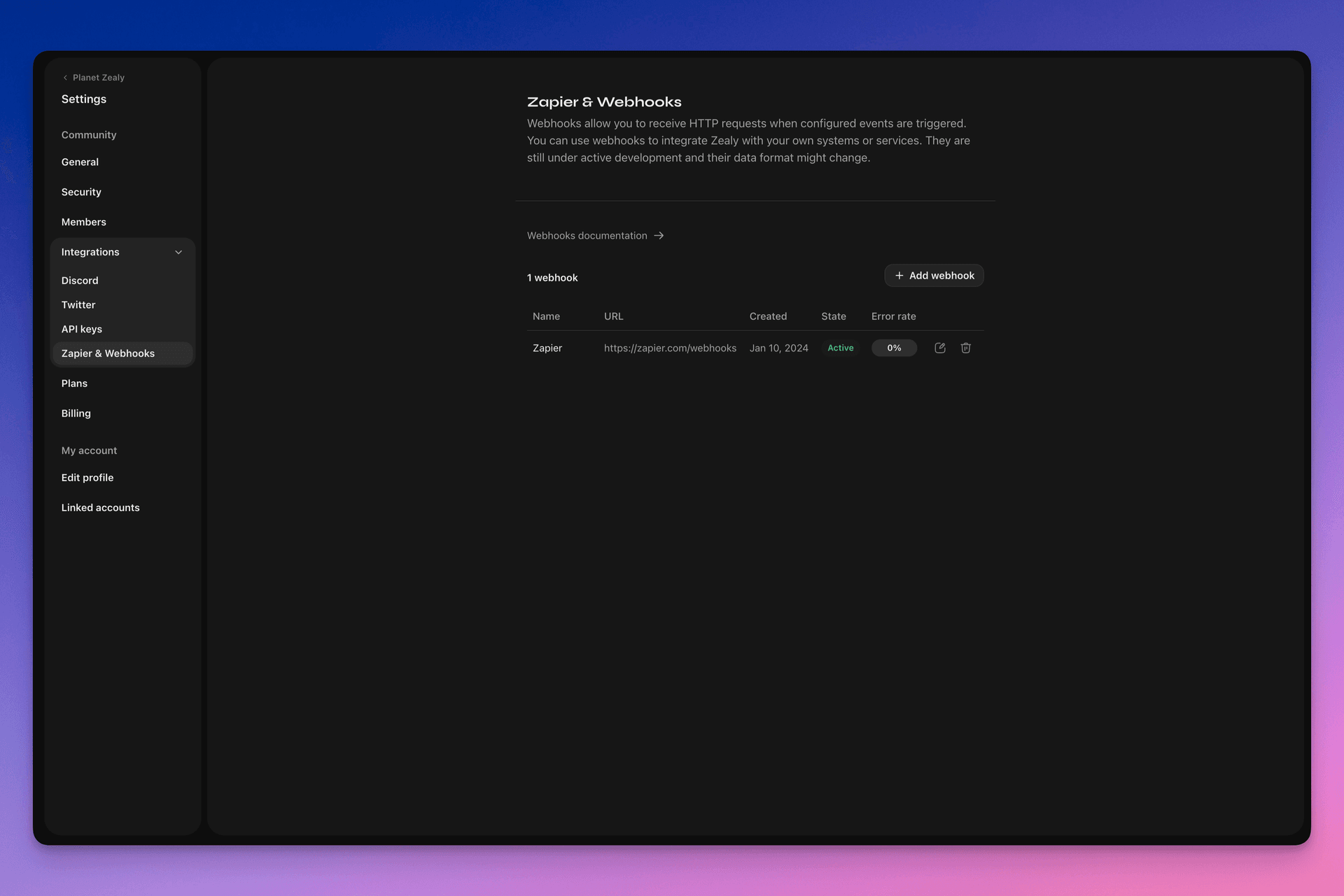
请前往设置 > 集成 > Zapier 与 Webhooks 来设置你的 webhook。
Webhook 如何工作?
Webhook 推送只是一个发送到你选择的 URL 的 HTTP POST 请求。当数据更新时,推送会由 Linear 自动触发。有关负载包含哪些数据的示例,请参阅 Webhook 负载.
你的 webhook 消费者是一个简单的 HTTP 端点。它必须满足以下条件:
- 它可通过公开访问的 HTTPS 非 localhost URL 访问
- 它会以
HTTP 200("OK")响应 Zealy Webhook 推送(HTTP POST 请求)
如果投递失败(即服务器不可用、响应耗时超过 5 秒、响应体大于 5000 字节或返回非 200 HTTP 状态码),推送将重试 15 次。此处使用指数退避延迟:大约 10 分钟后重试,然后 30 分钟,依此类推。如果 webhook URL 持续无响应,Zealy 可能会禁用该 webhook,必须手动重新启用。
为确保 Webhook POST 确实由 Zealy 创建,我们会生成一个随机密钥,并将其附加到请求体的 secret 字段中。
有关 Webhooks 的更多信息,有几个不错的资源:
- RequestBin:Webhooks – 权威指南
- requestbin.com 是测试 webhook 的绝佳工具
- GitHub 开发者指南:Webhooks
我可以用它做什么?
- 与 Zapier 集成
- 自动化自定义奖励
- 在 Telegram 上通知待审核的任务
以及更多更多!
Zealy Webhooks 入门
- 确定你想监控哪些事件。
- 开发一个 webhook 端点函数来接收事件数据 POST 请求。
- 使用设置 > 集成 > Zapier 与 Webhooks 中的 Webhooks 仪表板在 Zealy 中注册你的端点。
- 保护你的 webhook 端点。
创建一个简单的 Webhook 消费者
你可以考虑使用 Netlify Functions 之类的东西,它提供了一种部署简单 HTTP(S) 端点的直接方式: https://www.netlify.com/blog/2018/09/13/how-to-run-express.js-apps-with-netlify-functions/.
// server.js
//
// Use this sample code to handle webhook events in your integration.
//
// 1) Paste this code into a new file (server.js)
//
// 2) Install dependencies
//   npm install express
//
// 3) Run the server on http://localhost:4242
//   node server.js

// The library needs to be configured with your account's secret key.
// Ensure the key is kept out of any version control system you might be using.
const express = require('express');
const app = express();

// This is your Zealy webhook secret for testing your endpoint locally.
const endpointSecret = '5888a6800dbac634e52d8504f097e064';

app.post('/webhook', express.raw({ type: 'application/json' }), (request, response) => {
  const payload = req.body;
  // Does createdAt make more sense than time?
  const { id, type, data, time, secret } = payload;

  if (secret === endpointSecret) {
    // Do something neat with the data received!
  }

  // Return a 200 response to acknowledge receipt of the event
  response.send();
});

app.listen(4242, () => console.log('Running on port 4242'));
在设置中配置
在设置 > 集成 > Webhooks 中设置 webhook 及其应监控的事件。
Webhook 负载
webhook HTTP 负载将在其 HTTP 标头和请求体中包含信息。
负载将随以下 HTTP 标头发送:
User-Agent: Zealy-Webhook
Content-Type: application/json; charset=utf-8
{
  id: string // unique ID for this event (UUID v4)
  type: "JOINED_COMMUNITY" | "LEFT_COMMUNITY" | "QUEST_SUCCEEDED" | "QUEST_CLAIMED" | "QUEST_FAILED" | "QUEST_CLAIM_STATUS_UPDATED" | "SPRINT_STARTED" | "SPRINT_ENDED" | "USER_BANNED", // event type
  data: EventData, // event data, see below
  time: number, // timestamp, in milliseconds
  secret: string, // secret generated when you created your webhook, used for checking origin
}
每个事件的 EventData 字段:
// JOINED_COMMUNITY
type JoinedCommunityEventData = {
  community: WebhookCommunityPayload;
  user: WebhookUserPayload;
};

// LEFT_COMMUNITY
type LeftCommunityEventData = {
  community: WebhookCommunityPayload;
  user: WebhookUserPayload;
};

// QUEST_SUCCEEDED
type QuestSucceededEventData = {
  community: WebhookCommunityPayload;
  user: WebhookUserPayload;
  quest: WebhookQuestPayload;
  taskInputs?: Array<{
    taskId: string, // task ID (uuid v4)
    taskType: 'number' | 'date' | 'api' | 'text' | 'discord' | 'url' | 'telegram' | 'quiz' | 'invites' | 'visitLink' | 'file' | 'poll' | 'opinion' | 'twitterFollow' | 'twitterSpace' | 'tweetReact' | 'tweet',
    input: WebhookQuestTaskInputPayload,
  }>;
  status: 'success';
};

// QUEST_CLAIMED
type QuestClaimedEventData = {
  community: WebhookCommunityPayload;
  user: WebhookUserPayload;
  quest: WebhookQuestPayload;
  taskInputs?: Array<{
    taskId: string, // task ID (uuid v4)
    taskType: 'number' | 'date' | 'api' | 'text' | 'discord' | 'url' | 'telegram' | 'quiz' | 'invites' | 'visitLink' | 'file' | 'poll' | 'opinion' | 'twitterFollow' | 'twitterSpace' | 'tweetReact' | 'tweet',
    input: WebhookQuestTaskInputPayload,
  }>;
};

// QUEST_FAILED
type QuestFailedEventData = {
  community: WebhookCommunityPayload;
  user: WebhookUserPayload;
  quest: WebhookQuestPayload;
  taskInputs?: Array<{
    taskId: string, // task ID (uuid v4)
    taskType: 'number' | 'date' | 'api' | 'text' | 'discord' | 'url' | 'telegram' | 'quiz' | 'invites' | 'visitLink' | 'file' | 'poll' | 'opinion' | 'twitterFollow' | 'twitterSpace' | 'tweetReact' | 'tweet',
    input: WebhookQuestTaskInputPayload,
  }>;
};

// QUEST_CLAIM_STATUS_UPDATED
type QuestClaimStatusUpdatedEventData = {
  community: WebhookCommunityPayload;
  user: WebhookUserPayload;
  quest: WebhookQuestPayload;
  taskInputs?: Array<{
    taskId: string, // task ID (uuid v4)
    taskType: 'number' | 'date' | 'api' | 'text' | 'discord' | 'url' | 'telegram' | 'quiz' | 'invites' | 'visitLink' | 'file' | 'poll' | 'opinion' | 'twitterFollow' | 'twitterSpace' | 'tweetReact' | 'tweet',
    input: WebhookQuestTaskInputPayload,
  }>;
  status: 'success' | 'pending' | 'failed';
};

// SPRINT_STARTED
type SprintStartedEventData = {
  community: WebhookCommunityPayload;
  sprint: WebhookSprintPayload;
};

// SPRINT_ENDED
type SprintEndedEventData = {
  community: WebhookCommunityPayload;
  sprint: WebhookSprintPayload;
};

// USER_BANNED
type UserBannedEventData = {
  community: WebhookCommunityPayload;
  user: WebhookUserPayload;
};
常见实体:
type WebhookCommunityPayload = {
  id: string; // community ID (uuid V4)
  name: string; // community name
  subdomain: string; // community subdomain
  blockchain: string;
  discord: string | null; // discord URI of the community, e.g., https://discord.gg/zealy
  twitter: string | null; // twitter handle of the community, e.g., zealy_io
  website: string | null; // website URI of the community
};
type WebhookUserPayload = {
id: string; // user ID (uuid V4)
name: string | null; // user display name
twitter: {
id: string; // user twitter ID
username: string | null; // user twitter handle
} | null;
discord: {
id: string; // user discord ID
handle: string | null; // user discord handle
} | null;
email: string | null; // user email
addresses: Dict<string>; // key/value dictionary for wallets
verifiedAddresses: Dict<string>; // key/value dictionary for all users verified wallets
};type WebhookQuestPayload = {
id: string; // quest ID (uuid V4)
name: string; // quest display name
categoryId: string; // category ID (uuid V4)
categoryName: string | null; // category display name
xp: number | null; // XP reward
published: boolean | null; // true if quest is published, false otherwise
autoValidate: boolean | null;
tasks: TaskPayload[];
lastReviewerId: string; // user ID (uuid V4)
};type WebhookQuestTaskInputPayload =
| { } // for task type 'visitLink', 'invites', 'discord', 'telegram', 'twitterFollow', 'twitterSpace'
| { value: string } // for task type 'text', 'date', 'url', 'opinion'
| { value: number } // for task type 'number'
| { values: string[] } // for task type 'poll', 'quiz'
| { fileUrls: string[] } // for task type 'fileUrls'
| { tweetId?: string } // for task type 'tweetReact', 'tweet'
| { requestId: string, statusCode: number } // for task type 'api'type WebhookSprintPayload = {
id: string; // sprint ID (uuid V4)
startingAt: ISOString; // sprint starting date - https://developer.mozilla.org/en-US/docs/Web/JavaScript/Reference/Global_Objects/Date/toISOString
endingAt: ISOString; // sprint ending date
};保护 webhooks 安全
创建 webhook 会生成一个随机密钥,你可以用它来验证请求来自 Zealy webhooks。在 webhook 检查面板右上角复制密钥,并验证 POST 请求体中设置的密钥是否相同。
如果密钥泄露,你可以从同一页面重新生成它。

测试 webhooks
在 webhook 的检查面板中,你可以手动触发测试事件。点击右上角的按钮并选择“发送测试事件”。你将能够从受监控的事件类型中选择一种事件类型。将使用模拟数据触发事件并显示状态。
调试
如果你从 Webhooks 页面点击该 webhook,可以查看该 webhook 触发的所有过往事件的日志。按状态筛选,你可以使用日志来调试是否出了问题。对于每个事件,你可以看到收到的错误消息和发送的请求。
你还可以从此页面重试任何事件。
