Webhook
Nâng cao khả năng của Zealy với các kết nối Webhook.
Bởi louis, Fredrika, benjamin
Trên trang này
Webhook của Zealy gửi một HTTP POST đến URL bạn chọn khi một trong chín sự kiện cộng đồng xảy ra, trong đó có thành viên tham gia, nhiệm vụ được xác nhận thành công hoặc thất bại, sprint bắt đầu và người dùng bị cấm. Mỗi payload chứa id sự kiện, loại, dữ liệu, dấu thời gian tính bằng mili giây và secret chứng minh yêu cầu là thật.
Cơ bản
Zealy cung cấp webhook cho phép bạn nhận thông báo đẩy HTTP mỗi khi dữ liệu được tạo hoặc cập nhật. Điều này cho phép bạn xây dựng các tích hợp trên nền Zealy. Bạn có thể kích hoạt build CI, thực hiện tính toán trên dữ liệu nhiệm vụ hoặc gửi tin nhắn theo các điều kiện cụ thể – tùy bạn.
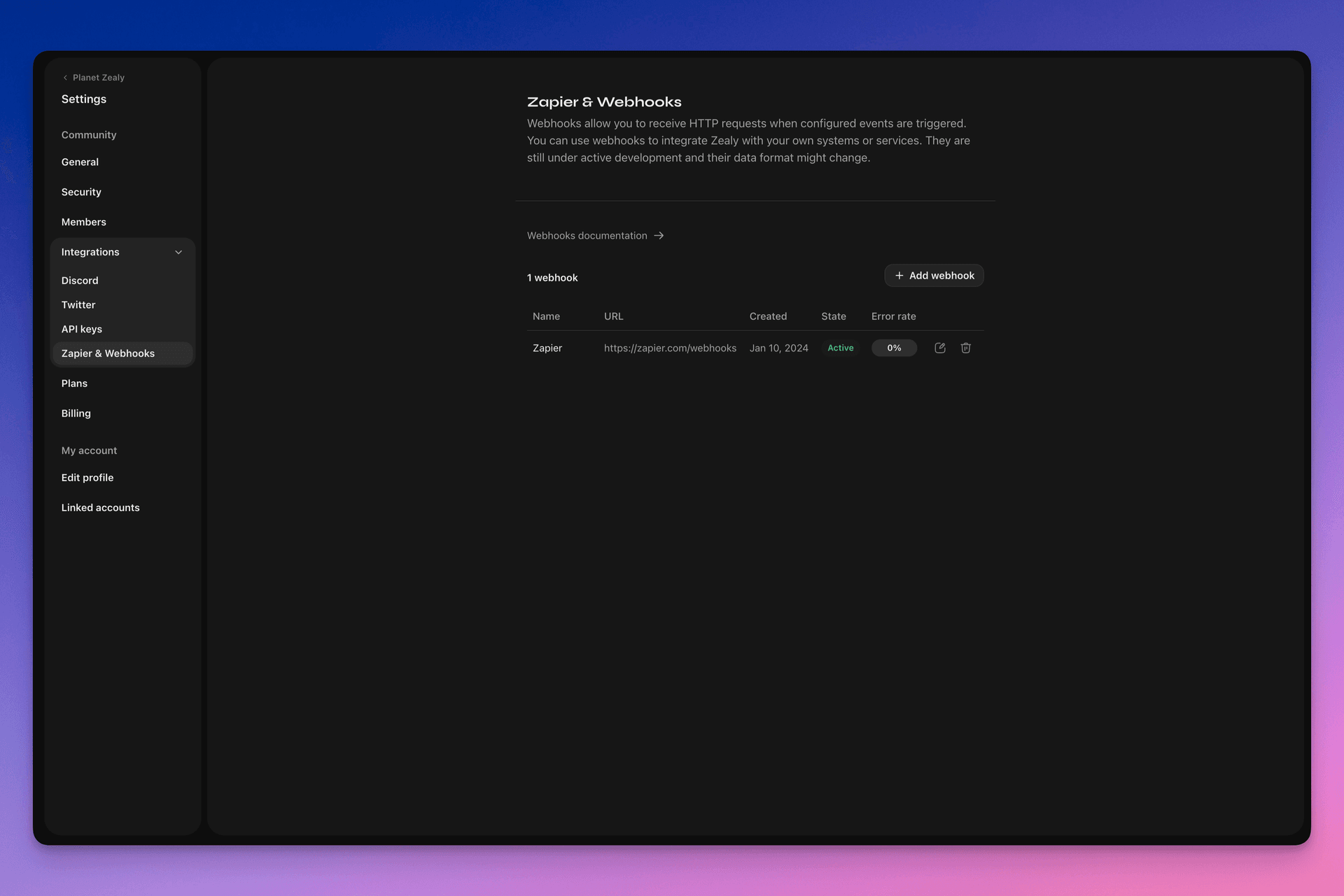
Vui lòng truy cập Settings > Integrations > Zapier & Webhooks để thiết lập webhook của bạn.
Webhook hoạt động như thế nào?
Một lần đẩy Webhook chỉ đơn giản là một yêu cầu HTTP POST được gửi đến URL bạn chọn. Lần đẩy được Linear tự động kích hoạt khi dữ liệu cập nhật. Để xem ví dụ về dữ liệu mà payload chứa, hãy xem Payload Webhook.
Trình nhận webhook của bạn là một endpoint HTTP đơn giản. Nó phải đáp ứng các điều kiện sau:
- Nó khả dụng tại một URL HTTPS công khai, không phải localhost
- Nó sẽ phản hồi lần đẩy Webhook của Zealy (yêu cầu HTTP POST) bằng phản hồi
HTTP 200("OK")
Nếu việc gửi thất bại (tức là máy chủ không khả dụng, phản hồi mất hơn 5 giây, nội dung phản hồi lớn hơn 5000 byte hoặc phản hồi với mã trạng thái HTTP khác 200), lần đẩy sẽ được thử lại 15 lần. Ở đây sử dụng độ trễ lùi theo cấp số nhân: lần thử sẽ được thử lại sau khoảng 10 phút, rồi 30 phút, v.v. Nếu URL webhook tiếp tục không phản hồi, webhook có thể bị Zealy vô hiệu hóa và phải được bật lại thủ công.
Để đảm bảo một Webhook POST thực sự được tạo bởi Zealy, chúng tôi tạo một secret ngẫu nhiên sẽ được đính kèm vào nội dung yêu cầu trong trường secret .
Để biết thêm thông tin về Webhook, có một số nguồn hữu ích:
- RequestBin: Webhooks – The Definitive Guide
- requestbin.com là một công cụ tuyệt vời để kiểm thử webhook
- GitHub Developer Guide: Webhooks
Tôi có thể dùng nó để làm gì?
- Tích hợp với Zapier
- Tự động hóa phần thưởng tùy chỉnh
- Thông báo các nhiệm vụ đang chờ duyệt trên Telegram
Và nhiều nhiều thứ khác nữa!
Bắt đầu với Webhook của Zealy
- Xác định những sự kiện bạn muốn theo dõi.
- Phát triển một hàm endpoint webhook để nhận các yêu cầu POST dữ liệu sự kiện.
- Đăng ký endpoint của bạn trong Zealy bằng Webhooks Dashboard tại Settings > Integrations > Zapier & Webhooks.
- Bảo mật endpoint webhook của bạn.
Tạo một trình nhận Webhook đơn giản
Bạn có thể cân nhắc sử dụng thứ gì đó như Netlify Functions, cung cấp cách đơn giản để triển khai các endpoint HTTP(S): https://www.netlify.com/blog/2018/09/13/how-to-run-express.js-apps-with-netlify-functions/.
// server.js
//
// Use this sample code to handle webhook events in your integration.
//
// 1) Paste this code into a new file (server.js)
//
// 2) Install dependencies
//   npm install express
//
// 3) Run the server on http://localhost:4242
//   node server.js

// The library needs to be configured with your account's secret key.
// Ensure the key is kept out of any version control system you might be using.
const express = require('express');
const app = express();

// This is your Zealy webhook secret for testing your endpoint locally.
const endpointSecret = '5888a6800dbac634e52d8504f097e064';

app.post('/webhook', express.raw({ type: 'application/json' }), (request, response) => {
  const payload = req.body;
  // Does createdAt make more sense than time?
  const { id, type, data, time, secret } = payload;

  if (secret === endpointSecret) {
    // Do something neat with the data received!
  }

  // Return a 200 response to acknowledge receipt of the event
  response.send();
});

app.listen(4242, () => console.log('Running on port 4242'));
Cấu hình trong phần cài đặt
Thiết lập webhook và các sự kiện mà nó cần theo dõi tại Settings > Integrations > Webhooks.
Payload của Webhook
Payload HTTP của webhook sẽ bao gồm thông tin trong cả header HTTP và nội dung yêu cầu.
Payload sẽ được gửi với các header HTTP sau:
User-Agent: Zealy-Webhook
Content-Type: application/json; charset=utf-8
{
  id: string // unique ID for this event (UUID v4)
  type: "JOINED_COMMUNITY" | "LEFT_COMMUNITY" | "QUEST_SUCCEEDED" | "QUEST_CLAIMED" | "QUEST_FAILED" | "QUEST_CLAIM_STATUS_UPDATED" | "SPRINT_STARTED" | "SPRINT_ENDED" | "USER_BANNED", // event type
  data: EventData, // event data, see below
  time: number, // timestamp, in milliseconds
  secret: string, // secret generated when you created your webhook, used for checking origin
}
Trường EventData theo từng sự kiện:
// JOINED_COMMUNITY
type JoinedCommunityEventData = {
  community: WebhookCommunityPayload;
  user: WebhookUserPayload;
};

// LEFT_COMMUNITY
type LeftCommunityEventData = {
  community: WebhookCommunityPayload;
  user: WebhookUserPayload;
};

// QUEST_SUCCEEDED
type QuestSucceededEventData = {
  community: WebhookCommunityPayload;
  user: WebhookUserPayload;
  quest: WebhookQuestPayload;
  taskInputs?: Array<{
    taskId: string, // task ID (uuid v4)
    taskType: 'number' | 'date' | 'api' | 'text' | 'discord' | 'url' | 'telegram' | 'quiz' | 'invites' | 'visitLink' | 'file' | 'poll' | 'opinion' | 'twitterFollow' | 'twitterSpace' | 'tweetReact' | 'tweet',
    input: WebhookQuestTaskInputPayload,
  }>;
  status: 'success';
};

// QUEST_CLAIMED
type QuestClaimedEventData = {
  community: WebhookCommunityPayload;
  user: WebhookUserPayload;
  quest: WebhookQuestPayload;
  taskInputs?: Array<{
    taskId: string, // task ID (uuid v4)
    taskType: 'number' | 'date' | 'api' | 'text' | 'discord' | 'url' | 'telegram' | 'quiz' | 'invites' | 'visitLink' | 'file' | 'poll' | 'opinion' | 'twitterFollow' | 'twitterSpace' | 'tweetReact' | 'tweet',
    input: WebhookQuestTaskInputPayload,
  }>;
};

// QUEST_FAILED
type QuestFailedEventData = {
  community: WebhookCommunityPayload;
  user: WebhookUserPayload;
  quest: WebhookQuestPayload;
  taskInputs?: Array<{
    taskId: string, // task ID (uuid v4)
    taskType: 'number' | 'date' | 'api' | 'text' | 'discord' | 'url' | 'telegram' | 'quiz' | 'invites' | 'visitLink' | 'file' | 'poll' | 'opinion' | 'twitterFollow' | 'twitterSpace' | 'tweetReact' | 'tweet',
    input: WebhookQuestTaskInputPayload,
  }>;
};

// QUEST_CLAIM_STATUS_UPDATED
type QuestClaimStatusUpdatedEventData = {
  community: WebhookCommunityPayload;
  user: WebhookUserPayload;
  quest: WebhookQuestPayload;
  taskInputs?: Array<{
    taskId: string, // task ID (uuid v4)
    taskType: 'number' | 'date' | 'api' | 'text' | 'discord' | 'url' | 'telegram' | 'quiz' | 'invites' | 'visitLink' | 'file' | 'poll' | 'opinion' | 'twitterFollow' | 'twitterSpace' | 'tweetReact' | 'tweet',
    input: WebhookQuestTaskInputPayload,
  }>;
  status: 'success' | 'pending' | 'failed';
};

// SPRINT_STARTED
type SprintStartedEventData = {
  community: WebhookCommunityPayload;
  sprint: WebhookSprintPayload;
};

// SPRINT_ENDED
type SprintEndedEventData = {
  community: WebhookCommunityPayload;
  sprint: WebhookSprintPayload;
};

// USER_BANNED
type UserBannedEventData = {
  community: WebhookCommunityPayload;
  user: WebhookUserPayload;
};
Các thực thể chung:
type WebhookCommunityPayload = {
  id: string; // community ID (uuid V4)
  name: string; // community name
  subdomain: string; // community subdomain
  blockchain: string;
  discord: string | null; // discord URI of the community, e.g., https://discord.gg/zealy
  twitter: string | null; // twitter handle of the community, e.g., zealy_io
  website: string | null; // website URI of the community
};
type WebhookUserPayload = {
id: string; // user ID (uuid V4)
name: string | null; // user display name
twitter: {
id: string; // user twitter ID
username: string | null; // user twitter handle
} | null;
discord: {
id: string; // user discord ID
handle: string | null; // user discord handle
} | null;
email: string | null; // user email
addresses: Dict<string>; // key/value dictionary for wallets
verifiedAddresses: Dict<string>; // key/value dictionary for all users verified wallets
};type WebhookQuestPayload = {
id: string; // quest ID (uuid V4)
name: string; // quest display name
categoryId: string; // category ID (uuid V4)
categoryName: string | null; // category display name
xp: number | null; // XP reward
published: boolean | null; // true if quest is published, false otherwise
autoValidate: boolean | null;
tasks: TaskPayload[];
lastReviewerId: string; // user ID (uuid V4)
};type WebhookQuestTaskInputPayload =
| { } // for task type 'visitLink', 'invites', 'discord', 'telegram', 'twitterFollow', 'twitterSpace'
| { value: string } // for task type 'text', 'date', 'url', 'opinion'
| { value: number } // for task type 'number'
| { values: string[] } // for task type 'poll', 'quiz'
| { fileUrls: string[] } // for task type 'fileUrls'
| { tweetId?: string } // for task type 'tweetReact', 'tweet'
| { requestId: string, statusCode: number } // for task type 'api'type WebhookSprintPayload = {
id: string; // sprint ID (uuid V4)
startingAt: ISOString; // sprint starting date - https://developer.mozilla.org/en-US/docs/Web/JavaScript/Reference/Global_Objects/Date/toISOString
endingAt: ISOString; // sprint ending date
};Bảo mật webhook
Tạo webhook sẽ tạo một secret ngẫu nhiên mà bạn có thể dùng để xác minh rằng yêu cầu đến từ webhook của Zealy. Sao chép secret ở góc trên bên phải của bảng kiểm tra webhook và xác minh rằng secret được đặt trong nội dung yêu cầu POST là giống nhau.
Trong trường hợp secret bị lộ, bạn có thể tạo lại nó từ cùng trang đó.

Kiểm thử webhook
Từ bảng kiểm tra của webhook, bạn có thể kích hoạt thủ công một sự kiện kiểm thử. Nhấp vào nút ở góc trên bên phải và chọn ‘Send test event’. Bạn sẽ có thể chọn một loại sự kiện trong số các loại sự kiện được theo dõi. Một sự kiện sẽ được kích hoạt với dữ liệu giả và trạng thái sẽ được hiển thị.
Gỡ lỗi
Bạn có thể xem nhật ký của tất cả các sự kiện trước đây được kích hoạt bởi webhook nếu bạn nhấp vào webhook từ trang Webhooks. Lọc theo trạng thái, bạn có thể dùng nhật ký để gỡ lỗi nếu có sự cố. Với mỗi sự kiện, bạn có thể thấy thông báo lỗi nhận được và yêu cầu đã được gửi.
Bạn cũng có thể thử lại bất kỳ sự kiện nào từ trang này.
