Webhooks
เพิ่มความสามารถของ Zealy ด้วยการเชื่อมต่อ Webhook
โดย louis, Fredrika, benjamin
ในหน้านี้
Zealy webhook จะส่ง HTTP POST ไปยัง URL ที่คุณเลือกเมื่อหนึ่งในเก้าเหตุการณ์ของชุมชนเกิดขึ้น ซึ่งรวมถึงการที่สมาชิกเข้าร่วม การส่งคำขอเควสสำเร็จหรือล้มเหลว การเริ่มต้นสปรินต์ และการแบนผู้ใช้ แต่ละ payload จะมี event id, type, data, timestamp เป็นมิลลิวินาที และ secret ที่พิสูจน์ว่าคำขอเป็นของจริง
พื้นฐาน
Zealy มี webhooks ซึ่งช่วยให้คุณได้รับการแจ้งเตือนแบบ HTTP push เมื่อมีการสร้างหรืออัปเดตข้อมูล สิ่งนี้ช่วยให้คุณสร้างการเชื่อมต่อบน Zealy ได้ คุณสามารถทริกเกอร์ CI builds, คำนวณข้อมูลเควส หรือส่งข้อความตามเงื่อนไขเฉพาะ – แล้วแต่คุณ
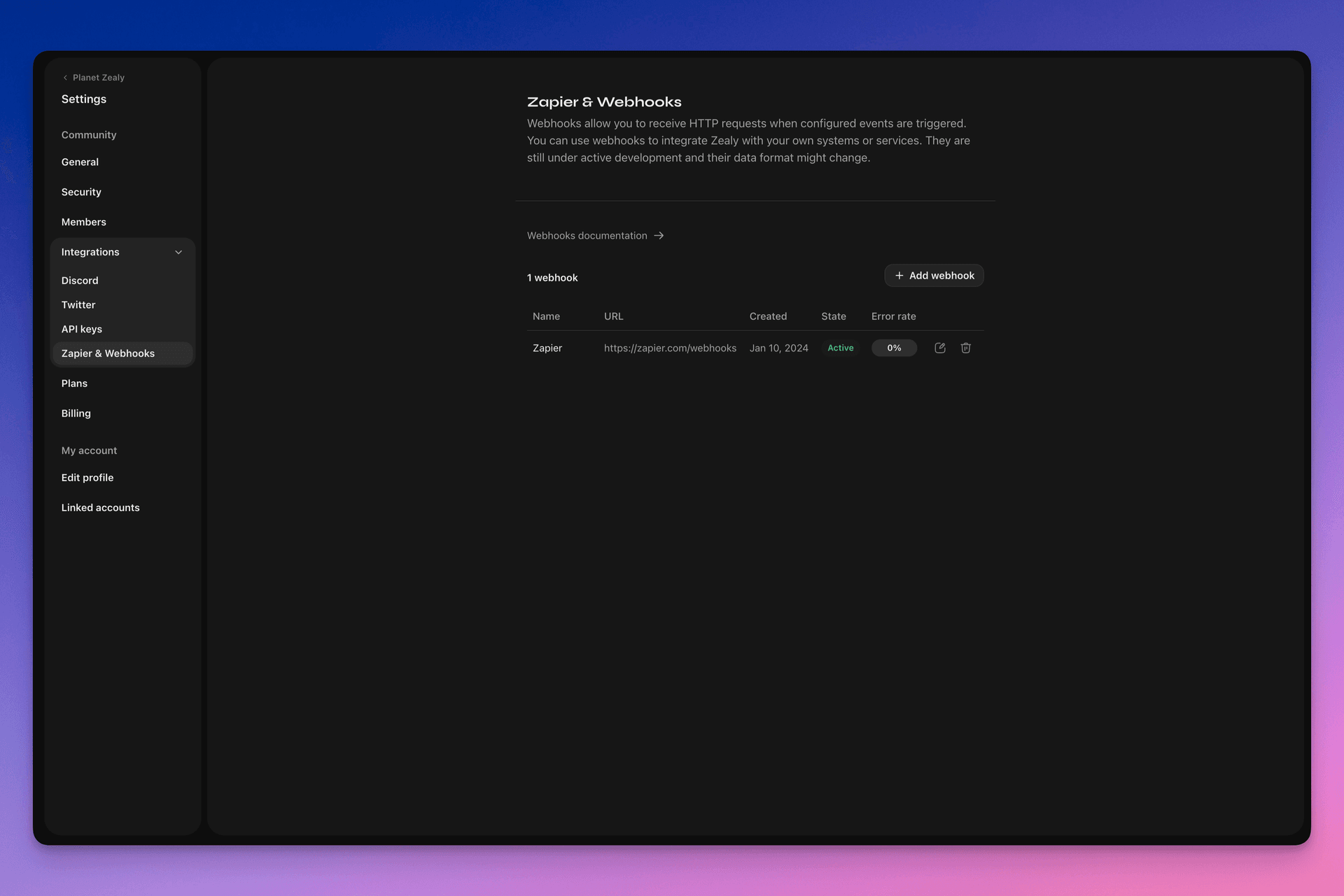
โปรดไปที่ Settings > Integrations > Zapier & Webhooks เพื่อตั้งค่า webhooks ของคุณ
Webhook ทำงานอย่างไร?
Webhook push เป็นเพียง HTTP POST request ที่ส่งไปยัง URL ที่คุณเลือก การ push จะถูกทริกเกอร์โดยอัตโนมัติโดย Linear เมื่อข้อมูลอัปเดต ดูตัวอย่างข้อมูลที่ payload มีได้ที่ Webhook Payload.
ตัวรับ webhook ของคุณเป็น HTTP endpoint ง่ายๆ ที่ต้องเป็นไปตามเงื่อนไขต่อไปนี้:
- ต้องเข้าถึงได้ผ่าน HTTPS ที่ไม่ใช่ localhost และเป็น URL สาธารณะ
- จะตอบสนองต่อ Zealy Webhook push (HTTP POST request) ด้วย
HTTP 200("OK") response
หากการส่งล้มเหลว (เช่น เซิร์ฟเวอร์ไม่พร้อมใช้งาน การตอบสนองใช้เวลานานกว่า 5 วินาที เนื้อหาการตอบสนองใหญ่กว่า 5000 ไบต์ หรือตอบกลับด้วยรหัสสถานะ HTTP ที่ไม่ใช่ 200) การ push จะถูกส่งซ้ำ 15 ครั้ง โดยใช้การหน่วงเวลาแบบ exponential backoff: จะลองใหม่หลังจากประมาณ 10 นาที จากนั้น 30 นาที และอื่นๆ หาก URL ของ webhook ยังไม่ตอบสนอง webhook อาจถูกปิดใช้งานโดย Zealy และต้องเปิดใช้งานใหม่ด้วยตนเอง
เพื่อให้แน่ใจว่า Webhook POST ถูกสร้างโดย Zealy จริง เราจะสร้าง secret แบบสุ่มที่จะแนบไปกับ body ของคำขอในฟิลด์ secret field
สำหรับข้อมูลเพิ่มเติมเกี่ยวกับ Webhooks มีแหล่งข้อมูลที่ดีหลายแห่ง:
- RequestBin: Webhooks – The Definitive Guide
- requestbin.com เป็นเครื่องมือที่ดีสำหรับการทดสอบ webhooks
- GitHub Developer Guide: Webhooks
ฉันสามารถใช้มันเพื่ออะไรได้บ้าง?
- เชื่อมต่อกับ Zapier
- ทำให้รางวัลที่กำหนดเองเป็นอัตโนมัติ
- แจ้งเตือนเควสที่รอการตรวจสอบบน Telegram
และอีกมากมาย!
เริ่มต้นกับ Zealy Webhooks
- ระบุเหตุการณ์ที่คุณต้องการตรวจสอบ
- พัฒนาฟังก์ชัน webhook endpoint เพื่อรับคำขอ POST ของข้อมูลเหตุการณ์
- ลงทะเบียน endpoint ของคุณภายใน Zealy โดยใช้ Webhooks Dashboard ใน Settings > Integrations > Zapier & Webhooks
- รักษาความปลอดภัย webhook endpoint ของคุณ
การสร้างตัวรับ Webhook อย่างง่าย
คุณอาจพิจารณาใช้สิ่งเช่น Netlify Functions ซึ่งให้วิธีที่ตรงไปตรงมาในการปรับใช้ HTTP(S) endpoints ง่ายๆ: https://www.netlify.com/blog/2018/09/13/how-to-run-express.js-apps-with-netlify-functions/.
// server.js
//
// Use this sample code to handle webhook events in your integration.
//
// 1) Paste this code into a new file (server.js)
//
// 2) Install dependencies
//   npm install express
//
// 3) Run the server on http://localhost:4242
//   node server.js

// The library needs to be configured with your account's secret key.
// Ensure the key is kept out of any version control system you might be using.
const express = require('express');
const app = express();

// This is your Zealy webhook secret for testing your endpoint locally.
const endpointSecret = '5888a6800dbac634e52d8504f097e064';

app.post('/webhook', express.raw({ type: 'application/json' }), (request, response) => {
  const payload = req.body;
  // Does createdAt make more sense than time?
  const { id, type, data, time, secret } = payload;

  if (secret === endpointSecret) {
    // Do something neat with the data received!
  }

  // Return a 200 response to acknowledge receipt of the event
  response.send();
});

app.listen(4242, () => console.log('Running on port 4242'));
การกำหนดค่าในการตั้งค่า
ตั้งค่า webhook และเหตุการณ์ที่ควรตรวจสอบใน Settings > Integrations > Webhooks
Webhook payload
HTTP payload ของ webhook จะมีข้อมูลทั้งใน HTTP headers และ request body
payload จะถูกส่งพร้อม HTTP headers ต่อไปนี้:
User-Agent: Zealy-Webhook
Content-Type: application/json; charset=utf-8
{
  id: string // unique ID for this event (UUID v4)
  type: "JOINED_COMMUNITY" | "LEFT_COMMUNITY" | "QUEST_SUCCEEDED" | "QUEST_CLAIMED" | "QUEST_FAILED" | "QUEST_CLAIM_STATUS_UPDATED" | "SPRINT_STARTED" | "SPRINT_ENDED" | "USER_BANNED", // event type
  data: EventData, // event data, see below
  time: number, // timestamp, in milliseconds
  secret: string, // secret generated when you created your webhook, used for checking origin
}
ฟิลด์ EventData ต่อเหตุการณ์:
// JOINED_COMMUNITY
type JoinedCommunityEventData = {
  community: WebhookCommunityPayload;
  user: WebhookUserPayload;
};

// LEFT_COMMUNITY
type LeftCommunityEventData = {
  community: WebhookCommunityPayload;
  user: WebhookUserPayload;
};

// QUEST_SUCCEEDED
type QuestSucceededEventData = {
  community: WebhookCommunityPayload;
  user: WebhookUserPayload;
  quest: WebhookQuestPayload;
  taskInputs?: Array<{
    taskId: string, // task ID (uuid v4)
    taskType: 'number' | 'date' | 'api' | 'text' | 'discord' | 'url' | 'telegram' | 'quiz' | 'invites' | 'visitLink' | 'file' | 'poll' | 'opinion' | 'twitterFollow' | 'twitterSpace' | 'tweetReact' | 'tweet',
    input: WebhookQuestTaskInputPayload,
  }>;
  status: 'success';
};

// QUEST_CLAIMED
type QuestClaimedEventData = {
  community: WebhookCommunityPayload;
  user: WebhookUserPayload;
  quest: WebhookQuestPayload;
  taskInputs?: Array<{
    taskId: string, // task ID (uuid v4)
    taskType: 'number' | 'date' | 'api' | 'text' | 'discord' | 'url' | 'telegram' | 'quiz' | 'invites' | 'visitLink' | 'file' | 'poll' | 'opinion' | 'twitterFollow' | 'twitterSpace' | 'tweetReact' | 'tweet',
    input: WebhookQuestTaskInputPayload,
  }>;
};

// QUEST_FAILED
type QuestFailedEventData = {
  community: WebhookCommunityPayload;
  user: WebhookUserPayload;
  quest: WebhookQuestPayload;
  taskInputs?: Array<{
    taskId: string, // task ID (uuid v4)
    taskType: 'number' | 'date' | 'api' | 'text' | 'discord' | 'url' | 'telegram' | 'quiz' | 'invites' | 'visitLink' | 'file' | 'poll' | 'opinion' | 'twitterFollow' | 'twitterSpace' | 'tweetReact' | 'tweet',
    input: WebhookQuestTaskInputPayload,
  }>;
};

// QUEST_CLAIM_STATUS_UPDATED
type QuestClaimStatusUpdatedEventData = {
  community: WebhookCommunityPayload;
  user: WebhookUserPayload;
  quest: WebhookQuestPayload;
  taskInputs?: Array<{
    taskId: string, // task ID (uuid v4)
    taskType: 'number' | 'date' | 'api' | 'text' | 'discord' | 'url' | 'telegram' | 'quiz' | 'invites' | 'visitLink' | 'file' | 'poll' | 'opinion' | 'twitterFollow' | 'twitterSpace' | 'tweetReact' | 'tweet',
    input: WebhookQuestTaskInputPayload,
  }>;
  status: 'success' | 'pending' | 'failed';
};

// SPRINT_STARTED
type SprintStartedEventData = {
  community: WebhookCommunityPayload;
  sprint: WebhookSprintPayload;
};

// SPRINT_ENDED
type SprintEndedEventData = {
  community: WebhookCommunityPayload;
  sprint: WebhookSprintPayload;
};

// USER_BANNED
type UserBannedEventData = {
  community: WebhookCommunityPayload;
  user: WebhookUserPayload;
};
เอนทิตีทั่วไป:
type WebhookCommunityPayload = {
  id: string; // community ID (uuid V4)
  name: string; // community name
  subdomain: string; // community subdomain
  blockchain: string;
  discord: string | null; // discord URI of the community, e.g., https://discord.gg/zealy
  twitter: string | null; // twitter handle of the community, e.g., zealy_io
  website: string | null; // website URI of the community
};
type WebhookUserPayload = {
id: string; // user ID (uuid V4)
name: string | null; // user display name
twitter: {
id: string; // user twitter ID
username: string | null; // user twitter handle
} | null;
discord: {
id: string; // user discord ID
handle: string | null; // user discord handle
} | null;
email: string | null; // user email
addresses: Dict<string>; // key/value dictionary for wallets
verifiedAddresses: Dict<string>; // key/value dictionary for all users verified wallets
};type WebhookQuestPayload = {
id: string; // quest ID (uuid V4)
name: string; // quest display name
categoryId: string; // category ID (uuid V4)
categoryName: string | null; // category display name
xp: number | null; // XP reward
published: boolean | null; // true if quest is published, false otherwise
autoValidate: boolean | null;
tasks: TaskPayload[];
lastReviewerId: string; // user ID (uuid V4)
};type WebhookQuestTaskInputPayload =
| { } // for task type 'visitLink', 'invites', 'discord', 'telegram', 'twitterFollow', 'twitterSpace'
| { value: string } // for task type 'text', 'date', 'url', 'opinion'
| { value: number } // for task type 'number'
| { values: string[] } // for task type 'poll', 'quiz'
| { fileUrls: string[] } // for task type 'fileUrls'
| { tweetId?: string } // for task type 'tweetReact', 'tweet'
| { requestId: string, statusCode: number } // for task type 'api'type WebhookSprintPayload = {
id: string; // sprint ID (uuid V4)
startingAt: ISOString; // sprint starting date - https://developer.mozilla.org/en-US/docs/Web/JavaScript/Reference/Global_Objects/Date/toISOString
endingAt: ISOString; // sprint ending date
};การรักษาความปลอดภัย webhooks
การสร้าง webhook จะสร้าง secret แบบสุ่มที่คุณสามารถใช้ตรวจสอบว่าคำขอมาจาก Zealy webhooks คัดลอก secret ที่มุมขวาบนของแผงตรวจสอบ webhook และตรวจสอบว่า secret ที่ตั้งไว้ใน body ของคำขอ POST เหมือนกัน
ในกรณีที่ secret รั่วไหล คุณสามารถสร้างใหม่ได้จากหน้าเดียวกัน

การทดสอบ webhooks
จากแผงตรวจสอบของ webhook คุณสามารถทริกเกอร์เหตุการณ์ทดสอบด้วยตนเองได้ คลิกปุ่มที่มุมขวาบนและเลือก 'Send test event' คุณจะสามารถเลือกประเภทเหตุการณ์จากประเภทเหตุการณ์ที่ตรวจสอบได้ เหตุการณ์จะถูกทริกเกอร์ด้วยข้อมูลจำลองและแสดงสถานะ
การดีบัก
คุณสามารถดูบันทึกของเหตุการณ์ที่ผ่านมาทั้งหมดที่ทริกเกอร์โดย webhook ได้หากคุณคลิก webhook จากหน้า Webhooks การกรองตามสถานะช่วยให้คุณใช้บันทึกเพื่อดีบักหากมีสิ่งผิดปกติ สำหรับแต่ละเหตุการณ์ คุณสามารถดูข้อความข้อผิดพลาดที่ได้รับและคำขอที่ส่งไป
คุณยังสามารถลองเหตุการณ์ใดก็ได้จากหน้านี้
