వెబ్హుక్లు
వెబ్హుక్ కనెక్షన్లతో Zealy సామర్థ్యాలను పెంచండి.
రచించినవారు louis, Fredrika, benjamin
ఈ పేజీలో
తొమ్మిది కమ్యూనిటీ ఈవెంట్లలో ఒకటి జరిగినప్పుడు Zealy వెబ్హుక్ మీరు ఎంచుకున్న URLకు HTTP POST పంపుతుంది; వాటిలో సభ్యుడు చేరడం, క్వెస్ట్ క్లెయిమ్ విజయవంతం కావడం లేదా విఫలం కావడం, స్ప్రింట్ ప్రారంభం కావడం, మరియు వినియోగదారు నిషేధించబడడం ఉన్నాయి. ప్రతి పేలోడ్ ఈవెంట్ id, రకం, డేటా, మిల్లీసెకన్ టైమ్స్టాంప్, మరియు అభ్యర్థన నిజమైనదని నిరూపించే సీక్రెట్ను కలిగి ఉంటుంది.
ప్రాథమికాలు
Zealy అందిస్తుంది వెబ్హుక్లు , ఇవి డేటా సృష్టించబడినప్పుడు లేదా నవీకరించబడినప్పుడు HTTP పుష్ నోటిఫికేషన్లను స్వీకరించడానికి మిమ్మల్ని అనుమతిస్తాయి. ఇది Zealy పై ఇంటిగ్రేషన్లను నిర్మించడానికి మిమ్మల్ని అనుమతిస్తుంది. మీరు CI బిల్డ్లను ట్రిగ్గర్ చేయవచ్చు, క్వెస్ట్ డేటాపై గణనలు చేయవచ్చు, లేదా నిర్దిష్ట పరిస్థితుల్లో సందేశాలు పంపవచ్చు – మీరు చెప్పేది ఏదైనా.
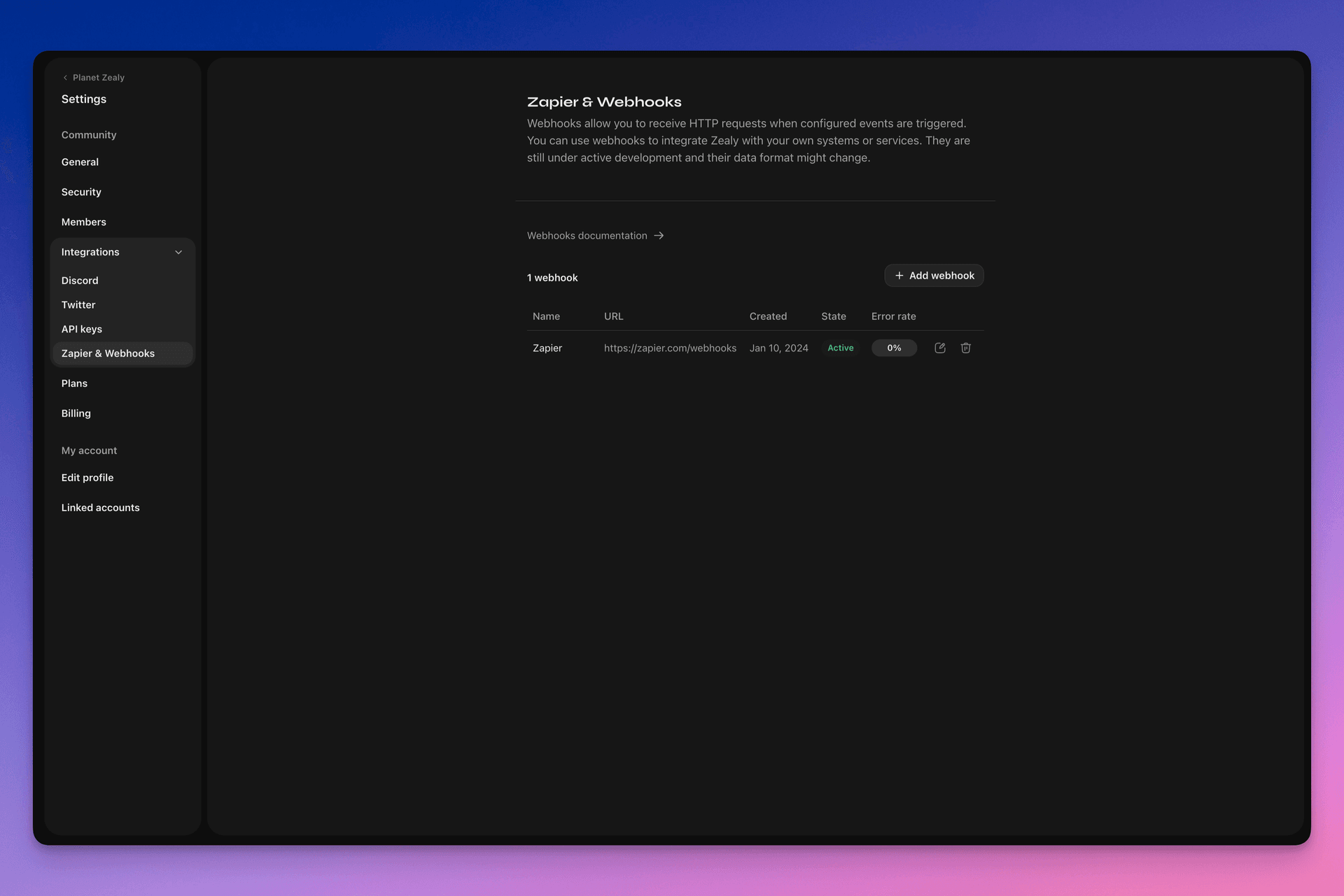
మీ వెబ్హుక్లను సెటప్ చేయడానికి Settings > Integrations > Zapier & Webhooksకు వెళ్లండి.
వెబ్హుక్ ఎలా పనిచేస్తుంది?
వెబ్హుక్ పుష్ అంటే కేవలం ఒక HTTP POST అభ్యర్థన, మీరు ఎంచుకున్న URLకు పంపబడుతుంది. డేటా అప్డేట్ అయినప్పుడు Linear ద్వారా ఈ పుష్ స్వయంచాలకంగా ట్రిగ్గర్ అవుతుంది. పేలోడ్లో ఏ డేటా ఉంటుందో ఉదాహరణ కోసం, చూడండి వెబ్హుక్ పేలోడ్.
మీ వెబ్హుక్ కన్స్యూమర్ ఒక సాధారణ HTTP ఎండ్పాయింట్. ఇది ఈ క్రింది షరతులను తీర్చాలి:
- ఇది పబ్లిక్గా యాక్సెస్ చేయగల HTTPS, లోకల్హోస్ట్ కాని URLలో అందుబాటులో ఉండాలి
- ఇది Zealy వెబ్హుక్ పుష్ (HTTP POST అభ్యర్థన)కు ఇది తో ప్రతిస్పందిస్తుంది
HTTP 200("OK") ప్రతిస్పందన
డెలివరీ విఫలమైతే (అంటే సర్వర్ అందుబాటులో లేకపోవడం, ప్రతిస్పందనకు 5 సెకన్లకు మించి సమయం పట్టడం, ప్రతిస్పందన బాడీ 5000 బైట్లకు మించి ఉండడం లేదా 200 కాని HTTP స్టేటస్ కోడ్తో ప్రతిస్పందించడం), పుష్ 15 సార్లు మళ్లీ ప్రయత్నించబడుతుంది. ఇక్కడ ఎక్స్పోనెన్షియల్ బ్యాక్ఆఫ్ ఆలస్యం ఉపయోగించబడుతుంది: ప్రయత్నం సుమారు 10 నిమిషాల తర్వాత, ఆపై 30 నిమిషాల తర్వాత, ఇలా మళ్లీ ప్రయత్నించబడుతుంది. వెబ్హుక్ URL ప్రతిస్పందించకపోతే, వెబ్హుక్ను Zealy నిలిపివేయవచ్చు మరియు దాన్ని మళ్లీ మాన్యువల్గా ప్రారంభించాలి.
వెబ్హుక్ POST నిజంగా Zealy ద్వారా సృష్టించబడిందని నిర్ధారించడానికి, మేము ఒక యాదృచ్ఛిక రహస్యాన్ని రూపొందిస్తాము, అది అభ్యర్థన బాడీలోని secret ఫీల్డ్కు జోడించబడుతుంది.
వెబ్హుక్లపై అదనపు సమాచారం కోసం, అనేక మంచి వనరులు ఉన్నాయి:
- RequestBin: Webhooks – The Definitive Guide
- requestbin.com వెబ్హుక్లను పరీక్షించడానికి ఒక గొప్ప సాధనం
- GitHub డెవలపర్ గైడ్: వెబ్హుక్స్
దీన్ని నేను ఎందుకు ఉపయోగించగలను?
- Zapier తో అనుసంధానించండి
- అనుకూల రివార్డులను ఆటోమేట్ చేయండి
- సమీక్షల కోసం వేచి ఉన్న క్వెస్ట్లను Telegram లో తెలియజేయండి
ఇంకా చాలా చాలా ఎక్కువ!
Zealy వెబ్హుక్స్తో ప్రారంభించడం
- మీరు ఏ ఈవెంట్లను పర్యవేక్షించాలనుకుంటున్నారో గుర్తించండి.
- ఈవెంట్ డేటా POST అభ్యర్థనలను స్వీకరించడానికి వెబ్హుక్ ఎండ్పాయింట్ ఫంక్షన్ను అభివృద్ధి చేయండి.
- Settings > Integrations > Zapier & Webhooks లోని Webhooks Dashboard ఉపయోగించి Zealy లో మీ ఎండ్పాయింట్ను నమోదు చేయండి.
- మీ వెబ్హుక్ ఎండ్పాయింట్ను సురక్షితం చేయండి.
సరళమైన Webhook consumer సృష్టించడం
సరళమైన HTTP(S) ఎండ్పాయింట్లను డిప్లాయ్ చేయడానికి సులభమైన మార్గాన్ని అందించే Netlify Functions వంటి వాటిని ఉపయోగించడాన్ని పరిగణించవచ్చు: https://www.netlify.com/blog/2018/09/13/how-to-run-express.js-apps-with-netlify-functions/.
// server.js
//
// Use this sample code to handle webhook events in your integration.
//
// 1) Paste this code into a new file (server.js)
//
// 2) Install dependencies
//   npm install express
//
// 3) Run the server on http://localhost:4242
//   node server.js

// The library needs to be configured with your account's secret key.
// Ensure the key is kept out of any version control system you might be using.
const express = require('express');
const app = express();

// This is your Zealy webhook secret for testing your endpoint locally.
const endpointSecret = '5888a6800dbac634e52d8504f097e064';

app.post('/webhook', express.raw({ type: 'application/json' }), (request, response) => {
  const payload = req.body;
  // Does createdAt make more sense than time?
  const { id, type, data, time, secret } = payload;

  if (secret === endpointSecret) {
    // Do something neat with the data received!
  }

  // Return a 200 response to acknowledge receipt of the event
  response.send();
});

app.listen(4242, () => console.log('Running on port 4242'));సెట్టింగ్లలో కాన్ఫిగర్ చేయడం
Settings > Integrations > Webhooks లో వెబ్హుక్ మరియు అది పర్యవేక్షించాల్సిన ఈవెంట్లను సెటప్ చేయండి.
Webhook పేలోడ్
Webhook HTTP పేలోడ్లో దాని HTTP హెడర్లు మరియు రిక్వెస్ట్ బాడీ రెండింటిలోనూ సమాచారం ఉంటుంది.
పేలోడ్ ఈ క్రింది HTTP హెడర్లతో పంపబడుతుంది:
User-Agent: Zealy-Webhook
Content-Type: application/json; charset=utf-8
{
  id: string // unique ID for this event (UUID v4)
  type: "JOINED_COMMUNITY" | "LEFT_COMMUNITY" | "QUEST_SUCCEEDED" | "QUEST_CLAIMED" | "QUEST_FAILED" | "QUEST_CLAIM_STATUS_UPDATED" | "SPRINT_STARTED" | "SPRINT_ENDED" | "USER_BANNED", // event type
  data: EventData, // event data, see below
  time: number, // timestamp, in milliseconds
  secret: string, // secret generated when you created your webhook, used for checking origin
}
ప్రతి ఈవెంట్కు EventData ఫీల్డ్:
// JOINED_COMMUNITY
type JoinedCommunityEventData = {
  community: WebhookCommunityPayload;
  user: WebhookUserPayload;
};

// LEFT_COMMUNITY
type LeftCommunityEventData = {
  community: WebhookCommunityPayload;
  user: WebhookUserPayload;
};

// QUEST_SUCCEEDED
type QuestSucceededEventData = {
  community: WebhookCommunityPayload;
  user: WebhookUserPayload;
  quest: WebhookQuestPayload;
  taskInputs?: Array<{
    taskId: string, // task ID (uuid v4)
    taskType: 'number' | 'date' | 'api' | 'text' | 'discord' | 'url' | 'telegram' | 'quiz' | 'invites' | 'visitLink' | 'file' | 'poll' | 'opinion' | 'twitterFollow' | 'twitterSpace' | 'tweetReact' | 'tweet',
    input: WebhookQuestTaskInputPayload,
  }>;
  status: 'success';
};

// QUEST_CLAIMED
type QuestClaimedEventData = {
  community: WebhookCommunityPayload;
  user: WebhookUserPayload;
  quest: WebhookQuestPayload;
  taskInputs?: Array<{
    taskId: string, // task ID (uuid v4)
    taskType: 'number' | 'date' | 'api' | 'text' | 'discord' | 'url' | 'telegram' | 'quiz' | 'invites' | 'visitLink' | 'file' | 'poll' | 'opinion' | 'twitterFollow' | 'twitterSpace' | 'tweetReact' | 'tweet',
    input: WebhookQuestTaskInputPayload,
  }>;
};

// QUEST_FAILED
type QuestFailedEventData = {
  community: WebhookCommunityPayload;
  user: WebhookUserPayload;
  quest: WebhookQuestPayload;
  taskInputs?: Array<{
    taskId: string, // task ID (uuid v4)
    taskType: 'number' | 'date' | 'api' | 'text' | 'discord' | 'url' | 'telegram' | 'quiz' | 'invites' | 'visitLink' | 'file' | 'poll' | 'opinion' | 'twitterFollow' | 'twitterSpace' | 'tweetReact' | 'tweet',
    input: WebhookQuestTaskInputPayload,
  }>;
};

// QUEST_CLAIM_STATUS_UPDATED
type QuestClaimStatusUpdatedEventData = {
  community: WebhookCommunityPayload;
  user: WebhookUserPayload;
  quest: WebhookQuestPayload;
  taskInputs?: Array<{
    taskId: string, // task ID (uuid v4)
    taskType: 'number' | 'date' | 'api' | 'text' | 'discord' | 'url' | 'telegram' | 'quiz' | 'invites' | 'visitLink' | 'file' | 'poll' | 'opinion' | 'twitterFollow' | 'twitterSpace' | 'tweetReact' | 'tweet',
    input: WebhookQuestTaskInputPayload,
  }>;
  status: 'success' | 'pending' | 'failed';
};

// SPRINT_STARTED
type SprintStartedEventData = {
  community: WebhookCommunityPayload;
  sprint: WebhookSprintPayload;
};

// SPRINT_ENDED
type SprintEndedEventData = {
  community: WebhookCommunityPayload;
  sprint: WebhookSprintPayload;
};

// USER_BANNED
type UserBannedEventData = {
  community: WebhookCommunityPayload;
  user: WebhookUserPayload;
};
సాధారణ ఎంటిటీలు:
type WebhookCommunityPayload = {
  id: string; // community ID (uuid V4)
  name: string; // community name
  subdomain: string; // community subdomain
  blockchain: string;
  discord: string | null; // discord URI of the community, e.g., https://discord.gg/zealy
  twitter: string | null; // twitter handle of the community, e.g., zealy_io
  website: string | null; // website URI of the community
};
type WebhookUserPayload = {
id: string; // user ID (uuid V4)
name: string | null; // user display name
twitter: {
id: string; // user twitter ID
username: string | null; // user twitter handle
} | null;
discord: {
id: string; // user discord ID
handle: string | null; // user discord handle
} | null;
email: string | null; // user email
addresses: Dict<string>; // key/value dictionary for wallets
verifiedAddresses: Dict<string>; // key/value dictionary for all users verified wallets
};type WebhookQuestPayload = {
id: string; // quest ID (uuid V4)
name: string; // quest display name
categoryId: string; // category ID (uuid V4)
categoryName: string | null; // category display name
xp: number | null; // XP reward
published: boolean | null; // true if quest is published, false otherwise
autoValidate: boolean | null;
tasks: TaskPayload[];
lastReviewerId: string; // user ID (uuid V4)
};type WebhookQuestTaskInputPayload =
| { } // for task type 'visitLink', 'invites', 'discord', 'telegram', 'twitterFollow', 'twitterSpace'
| { value: string } // for task type 'text', 'date', 'url', 'opinion'
| { value: number } // for task type 'number'
| { values: string[] } // for task type 'poll', 'quiz'
| { fileUrls: string[] } // for task type 'fileUrls'
| { tweetId?: string } // for task type 'tweetReact', 'tweet'
| { requestId: string, statusCode: number } // for task type 'api'type WebhookSprintPayload = {
id: string; // sprint ID (uuid V4)
startingAt: ISOString; // sprint starting date - https://developer.mozilla.org/en-US/docs/Web/JavaScript/Reference/Global_Objects/Date/toISOString
endingAt: ISOString; // sprint ending date
};Webhooks భద్రపరచడం
Webhook సృష్టించినప్పుడు ఒక యాదృచ్ఛిక సీక్రెట్ సృష్టించబడుతుంది, దాన్ని ఉపయోగించి రిక్వెస్ట్ Zealy webhooks నుండి వస్తున్నదని ధృవీకరించవచ్చు. Webhook inspect ప్యానెల్ కుడి ఎగువన ఉన్న సీక్రెట్ను కాపీ చేసి, POST రిక్వెస్ట్ బాడీలో సెట్ చేసిన సీక్రెట్ అదేనా అని ధృవీకరించండి.
సీక్రెట్ లీక్ అయిన సందర్భంలో, అదే పేజీ నుండి దాన్ని తిరిగి జనరేట్ చేయవచ్చు.

Webhooks పరీక్షించడం
Webhook inspect ప్యానెల్ నుండి మీరు పరీక్ష ఈవెంట్ను మాన్యువల్గా ట్రిగ్గర్ చేయవచ్చు. పైన కుడి వైపున ఉన్న బటన్ను క్లిక్ చేసి ‘Send test event’ ఎంచుకోండి. పర్యవేక్షించే ఈవెంట్ రకాల్లో ఒక ఈవెంట్ రకాన్ని ఎంచుకోవచ్చు. మాక్ డేటాతో ఈవెంట్ ట్రిగ్గర్ అవుతుంది మరియు స్థితి ప్రదర్శించబడుతుంది.
డీబగ్గింగ్
Webhooks పేజీలో webhook ను క్లిక్ చేస్తే, webhook ట్రిగ్గర్ చేసిన గత ఈవెంట్లన్నింటి లాగ్లను మీరు చూడవచ్చు. స్థితి ద్వారా ఫిల్టర్ చేసి, ఏదైనా తప్పు జరిగితే డీబగ్ చేయడానికి లాగ్లను ఉపయోగించవచ్చు. ప్రతి ఈవెంట్కు, అందుకున్న ఎర్రర్ సందేశం మరియు పంపిన అభ్యర్థనను మీరు చూడవచ్చు.
ఈ పేజీ నుండి ఏదైనా ఈవెంట్ను మళ్లీ ప్రయత్నించవచ్చు.
