Webhooks
Webhook සම්බන්ධතා සමඟ Zealy හි හැකියාවන් වැඩිදියුණු කරන්න.
විසින් louis, Fredrika, benjamin
මෙම පිටුවේ
Zealy webhook එකක් සම්ප්රදායික ප්රජා සිදුවීම් නවයෙන් එකක් සිදු වූ විට, ඒවා අතර සාමාජිකයෙකු එක්වීම, quest claim එකක් සාර්ථක වීම හෝ අසාර්ථක වීම, sprint එකක් ආරම්භ වීම සහ පරිශීලකයෙකු තහනම් කිරීම ඇතුළත් වේ, ඔබ තෝරන URL එකකට HTTP POST එකක් යවයි. සෑම payload එකක්ම සිදුවීම් id, වර්ගය, දත්ත, මිලි තත්පර timestamp එකක් සහ ඉල්ලීම සැබෑ බව ඔප්පු කරන රහස රැගෙන යයි.
මූලික කරුණු
Zealy ලබා දෙයි webhooks ඒවා මගින් දත්ත නිර්මාණය වන හෝ යාවත්කාලීන වන සෑම අවස්ථාවකම HTTP push දැනුම්දීම් ලබා ගැනීමට ඔබට ඉඩ සලසයි. මෙයින් ඔබට Zealy මත ඉහළින් integrations ගොඩනැගීමට හැකියාව ලැබේ. ඔබට CI builds ආරම්භ කිරීමට, quest දත්ත මත ගණනය කිරීම් සිදු කිරීමට හෝ නිශ්චිත කොන්දේසි මත පණිවිඩ යැවීමට හැකිය – ඔබ කියන ඕනෑම දෙයක්.
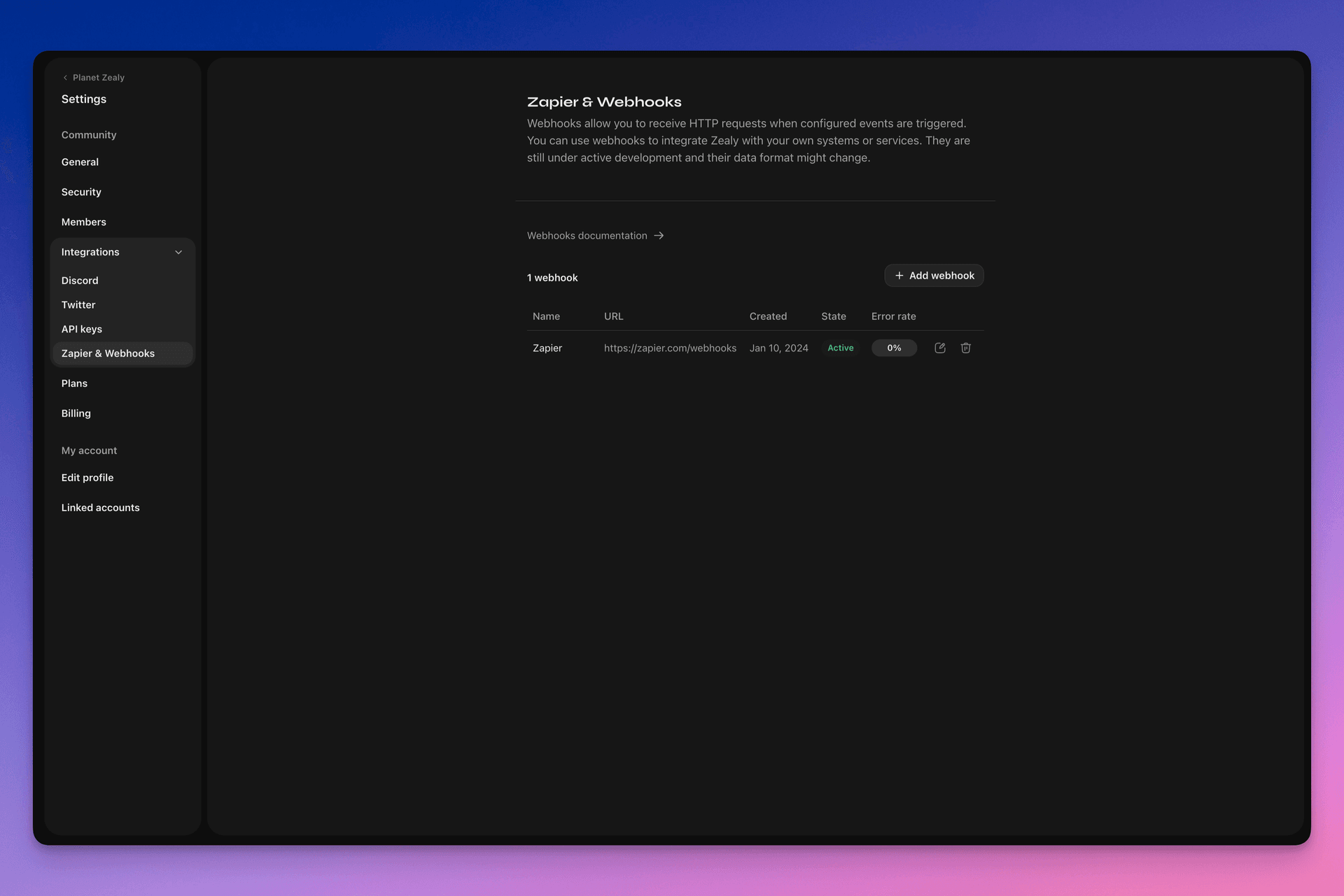
ඔබේ webhooks සැකසීමට කරුණාකර Settings > Integrations > Zapier & Webhooks වෙත පිවිසෙන්න.
Webhook එකක් ක්රියා කරන්නේ කෙසේද?
Webhook push එකක් යනු සරලව HTTP POST ඔබ තෝරන URL එකට යවන ඉල්ලීමකි. දත්ත යාවත්කාලීන වන විට Linear මගින් මෙම push එක ස්වයංක්රීයව ආරම්භ කරයි. payload එකක අඩංගු දත්ත පිළිබඳ උදාහරණයක් සඳහා බලන්න Webhook Payload.
ඔබේ webhook consumer යනු සරල HTTP endpoint එකකි. එය පහත කොන්දේසි සපුරාලිය යුතුය:
- එය පොදුවේ ප්රවේශ විය හැකි HTTPS, localhost නොවන URL එකක ලබා ගත හැකිය
- එය Zealy Webhook push (HTTP POST ඉල්ලීම) එකට
HTTP 200("OK") ප්රතිචාරයක් ලබා දෙනු ඇත
යම් බෙදාහැරීමක් අසාර්ථක වුවහොත් (එනම් සේවාදායකය නොමැති වීම, ප්රතිචාරයට තත්පර 5කට වඩා ගත වීම, ප්රතිචාර අන්තර්ගතය බයිට් 5000ට වඩා විශාල වීම හෝ 200 නොවන HTTP තත්ත්ව කේතයක් සමඟ ප්රතිචාර දැක්වීම), push යැවීම වාර 15ක් නැවත උත්සාහ කෙරේ. මෙහි ඝාතීය පසුබැසීමේ ප්රමාදයක් භාවිතා වේ: උත්සාහය ආසන්න වශයෙන් මිනිත්තු 10කට පසුව, පසුව මිනිත්තු 30කට පසුව යනාදී ලෙස නැවත උත්සාහ කෙරේ. webhook URL දිගටම ප්රතිචාර නොදක්වන්නේ නම්, Zealy විසින් webhook අබල කළ හැකි අතර, එය නැවත අතින් සක්රීය කළ යුතුය.
Webhook එකක් POST සැබවින්ම Zealy විසින් නිර්මාණය කර ඇති බව තහවුරු කිරීම සඳහා, අපි අහඹු රහසක් ජනනය කරන අතර එය ඉල්ලීමේ අන්තර්ගතයේ secret ක්ෂේත්රයට අමුණනු ලැබේ.
Webhooks පිළිබඳ අමතර තොරතුරු සඳහා හොඳ සම්පත් කිහිපයක් ඇත:
- RequestBin: Webhooks – The Definitive Guide
- requestbin.com webhooks පරීක්ෂා කිරීම සඳහා විශිෂ්ට මෙවලමකි
- GitHub Developer Guide: Webhooks
මට එය භාවිත කළ හැක්කේ කුමකටද?
- Zapier සමඟ ඒකාබද්ධ කරන්න
- අභිරුචි ත්යාග ස්වයංක්රීය කරන්න
- සමාලෝචන බලාපොරොත්තුවෙන් සිටින ක්වෙස්ට් Telegram හි දැනුම් දෙන්න
තවත් බොහෝ දේ!
Zealy Webhooks සමඟ ආරම්භ කිරීම
- ඔබ නිරීක්ෂණය කිරීමට අවශ්ය සිදුවීම් හඳුනා ගන්න.
- සිදුවීම් දත්ත POST ඉල්ලීම් ලබා ගැනීමට webhook endpoint ශ්රිතයක් සාදන්න.
- Settings > Integrations > Zapier & Webhooks තුළ Webhooks Dashboard භාවිතයෙන් Zealy තුළ ඔබේ endpoint ලියාපදිංචි කරන්න.
- ඔබේ webhook endpoint ආරක්ෂිත කරන්න.
සරල Webhook පාරිභෝගිකයෙකු සෑදීම
සරල HTTP(S) endpoints deploy කිරීමට සෘජු මාර්ගයක් සපයන Netlify Functions වැනි දෙයක් භාවිත කිරීම ගැන ඔබ සලකා බැලිය හැක: https://www.netlify.com/blog/2018/09/13/how-to-run-express.js-apps-with-netlify-functions/.
// server.js
//
// Use this sample code to handle webhook events in your integration.
//
// 1) Paste this code into a new file (server.js)
//
// 2) Install dependencies
//   npm install express
//
// 3) Run the server on http://localhost:4242
//   node server.js

// The library needs to be configured with your account's secret key.
// Ensure the key is kept out of any version control system you might be using.
const express = require('express');
const app = express();

// This is your Zealy webhook secret for testing your endpoint locally.
const endpointSecret = '5888a6800dbac634e52d8504f097e064';

app.post('/webhook', express.raw({ type: 'application/json' }), (request, response) => {
  const payload = req.body;
  // Does createdAt make more sense than time?
  const { id, type, data, time, secret } = payload;

  if (secret === endpointSecret) {
    // Do something neat with the data received!
  }

  // Return a 200 response to acknowledge receipt of the event
  response.send();
});

app.listen(4242, () => console.log('Running on port 4242'));
Settings තුළ වින්යාස කිරීම
Settings > Integrations > Webhooks තුළ webhook සහ එය නිරීක්ෂණය කළ යුතු සිදුවීම් සකසන්න.
Webhook payload එක
Webhook HTTP payload එකේ එහි HTTP headers සහ request body යන දෙකෙහිම තොරතුරු ඇතුළත් වේ.
Payload එක පහත HTTP headers සමඟ යවනු ලැබේ:
User-Agent: Zealy-Webhook
Content-Type: application/json; charset=utf-8
{
  id: string // unique ID for this event (UUID v4)
  type: "JOINED_COMMUNITY" | "LEFT_COMMUNITY" | "QUEST_SUCCEEDED" | "QUEST_CLAIMED" | "QUEST_FAILED" | "QUEST_CLAIM_STATUS_UPDATED" | "SPRINT_STARTED" | "SPRINT_ENDED" | "USER_BANNED", // event type
  data: EventData, // event data, see below
  time: number, // timestamp, in milliseconds
  secret: string, // secret generated when you created your webhook, used for checking origin
}
එක් එක් event සඳහා EventData field එක:
// JOINED_COMMUNITY
type JoinedCommunityEventData = {
  community: WebhookCommunityPayload;
  user: WebhookUserPayload;
};

// LEFT_COMMUNITY
type LeftCommunityEventData = {
  community: WebhookCommunityPayload;
  user: WebhookUserPayload;
};

// QUEST_SUCCEEDED
type QuestSucceededEventData = {
  community: WebhookCommunityPayload;
  user: WebhookUserPayload;
  quest: WebhookQuestPayload;
  taskInputs?: Array<{
    taskId: string, // task ID (uuid v4)
    taskType: 'number' | 'date' | 'api' | 'text' | 'discord' | 'url' | 'telegram' | 'quiz' | 'invites' | 'visitLink' | 'file' | 'poll' | 'opinion' | 'twitterFollow' | 'twitterSpace' | 'tweetReact' | 'tweet',
    input: WebhookQuestTaskInputPayload,
  }>;
  status: 'success';
};

// QUEST_CLAIMED
type QuestClaimedEventData = {
  community: WebhookCommunityPayload;
  user: WebhookUserPayload;
  quest: WebhookQuestPayload;
  taskInputs?: Array<{
    taskId: string, // task ID (uuid v4)
    taskType: 'number' | 'date' | 'api' | 'text' | 'discord' | 'url' | 'telegram' | 'quiz' | 'invites' | 'visitLink' | 'file' | 'poll' | 'opinion' | 'twitterFollow' | 'twitterSpace' | 'tweetReact' | 'tweet',
    input: WebhookQuestTaskInputPayload,
  }>;
};

// QUEST_FAILED
type QuestFailedEventData = {
  community: WebhookCommunityPayload;
  user: WebhookUserPayload;
  quest: WebhookQuestPayload;
  taskInputs?: Array<{
    taskId: string, // task ID (uuid v4)
    taskType: 'number' | 'date' | 'api' | 'text' | 'discord' | 'url' | 'telegram' | 'quiz' | 'invites' | 'visitLink' | 'file' | 'poll' | 'opinion' | 'twitterFollow' | 'twitterSpace' | 'tweetReact' | 'tweet',
    input: WebhookQuestTaskInputPayload,
  }>;
};

// QUEST_CLAIM_STATUS_UPDATED
type QuestClaimStatusUpdatedEventData = {
  community: WebhookCommunityPayload;
  user: WebhookUserPayload;
  quest: WebhookQuestPayload;
  taskInputs?: Array<{
    taskId: string, // task ID (uuid v4)
    taskType: 'number' | 'date' | 'api' | 'text' | 'discord' | 'url' | 'telegram' | 'quiz' | 'invites' | 'visitLink' | 'file' | 'poll' | 'opinion' | 'twitterFollow' | 'twitterSpace' | 'tweetReact' | 'tweet',
    input: WebhookQuestTaskInputPayload,
  }>;
  status: 'success' | 'pending' | 'failed';
};

// SPRINT_STARTED
type SprintStartedEventData = {
  community: WebhookCommunityPayload;
  sprint: WebhookSprintPayload;
};

// SPRINT_ENDED
type SprintEndedEventData = {
  community: WebhookCommunityPayload;
  sprint: WebhookSprintPayload;
};

// USER_BANNED
type UserBannedEventData = {
  community: WebhookCommunityPayload;
  user: WebhookUserPayload;
};
පොදු entities:
type WebhookCommunityPayload = {
  id: string; // community ID (uuid V4)
  name: string; // community name
  subdomain: string; // community subdomain
  blockchain: string;
  discord: string | null; // discord URI of the community, e.g., https://discord.gg/zealy
  twitter: string | null; // twitter handle of the community, e.g., zealy_io
  website: string | null; // website URI of the community
};
type WebhookUserPayload = {
id: string; // user ID (uuid V4)
name: string | null; // user display name
twitter: {
id: string; // user twitter ID
username: string | null; // user twitter handle
} | null;
discord: {
id: string; // user discord ID
handle: string | null; // user discord handle
} | null;
email: string | null; // user email
addresses: Dict<string>; // key/value dictionary for wallets
verifiedAddresses: Dict<string>; // key/value dictionary for all users verified wallets
};type WebhookQuestPayload = {
id: string; // quest ID (uuid V4)
name: string; // quest display name
categoryId: string; // category ID (uuid V4)
categoryName: string | null; // category display name
xp: number | null; // XP reward
published: boolean | null; // true if quest is published, false otherwise
autoValidate: boolean | null;
tasks: TaskPayload[];
lastReviewerId: string; // user ID (uuid V4)
};type WebhookQuestTaskInputPayload =
| { } // for task type 'visitLink', 'invites', 'discord', 'telegram', 'twitterFollow', 'twitterSpace'
| { value: string } // for task type 'text', 'date', 'url', 'opinion'
| { value: number } // for task type 'number'
| { values: string[] } // for task type 'poll', 'quiz'
| { fileUrls: string[] } // for task type 'fileUrls'
| { tweetId?: string } // for task type 'tweetReact', 'tweet'
| { requestId: string, statusCode: number } // for task type 'api'type WebhookSprintPayload = {
id: string; // sprint ID (uuid V4)
startingAt: ISOString; // sprint starting date - https://developer.mozilla.org/en-US/docs/Web/JavaScript/Reference/Global_Objects/Date/toISOString
endingAt: ISOString; // sprint ending date
};Webhooks ආරක්ෂා කිරීම
Webhook එකක් සෑදීමේදී, request එක Zealy webhooks වෙතින් පැමිණෙන බව තහවුරු කිරීමට භාවිත කළ හැකි අහඹු secret එකක් සෑදේ. Webhook inspect panel එකේ ඉහළ දකුණු කෙළවරේ ඇති secret එක පිටපත් කර, POST request එකේ body එකේ සකසා ඇති secret එක එයම බව තහවුරු කරන්න.
Secret එක හෙළිදරව් වූ අවස්ථාවක, එම පිටුවෙන්ම එය නැවත ජනනය කළ හැක.

Webhooks පරීක්ෂා කිරීම
Webhook හි පරීක්ෂණ පැනලයෙන් ඔබට අතින් පරීක්ෂණ සිදුවීමක් අවුලුවාලිය හැක. ඉහළ දකුණු කෙළවරේ ඇති බොත්තම ක්ලික් කර ‘Send test event’ තෝරන්න. නිරීක්ෂණය කරන සිදුවීම් වර්ග අතරින් සිදුවීම් වර්ගයක් තෝරාගත හැක. mock දත්ත සමඟ සිදුවීමක් අවුලුවාලෙන අතර තත්ත්වය පෙන්වනු ඇත.
නිර්දෝෂී කිරීම
Webhooks පිටුවෙන් webhook ක්ලික් කළහොත් webhook මගින් අවුලුවාලූ සියලුම පසුගිය සිදුවීම්වල ලොග ඔබට දැකගත හැක. තත්ත්වය අනුව පෙරහන් කිරීමෙන් යම් දෝෂයක් සිදුවී ඇත්නම් එය නිර්දෝෂී කිරීමට ලොග භාවිත කළ හැක. එක් එක් සිදුවීම සඳහා ලැබුණු දෝෂ පණිවිඩය සහ යවන ලද ඉල්ලීම ඔබට දැකගත හැක.
මෙම පිටුවෙන් ඕනෑම සිදුවීමක් නැවත උත්සාහ කළ හැක.
