Webhook-uri
Extinde capabilitățile Zealy cu conexiuni webhook.
De louis, Fredrika, benjamin
Pe această pagină
Un webhook Zealy trimite un HTTP POST către un URL ales de tine atunci când se declanșează unul dintre cele nouă evenimente ale comunității, printre care un membru care se alătură, o revendicare de quest reușită sau eșuată, un sprint care începe și un utilizator care este blocat. Fiecare payload conține un id de eveniment, tipul, datele, un timestamp în milisecunde și secretul care dovedește că cererea este autentică.
Noțiuni de bază
Zealy oferă webhook-uri care îți permit să primești notificări push HTTP ori de câte ori datele sunt create sau actualizate. Astfel poți construi integrări peste Zealy. Poți declanșa build-uri CI, efectua calcule pe datele questurilor sau trimite mesaje în condiții specifice – tu decizi.
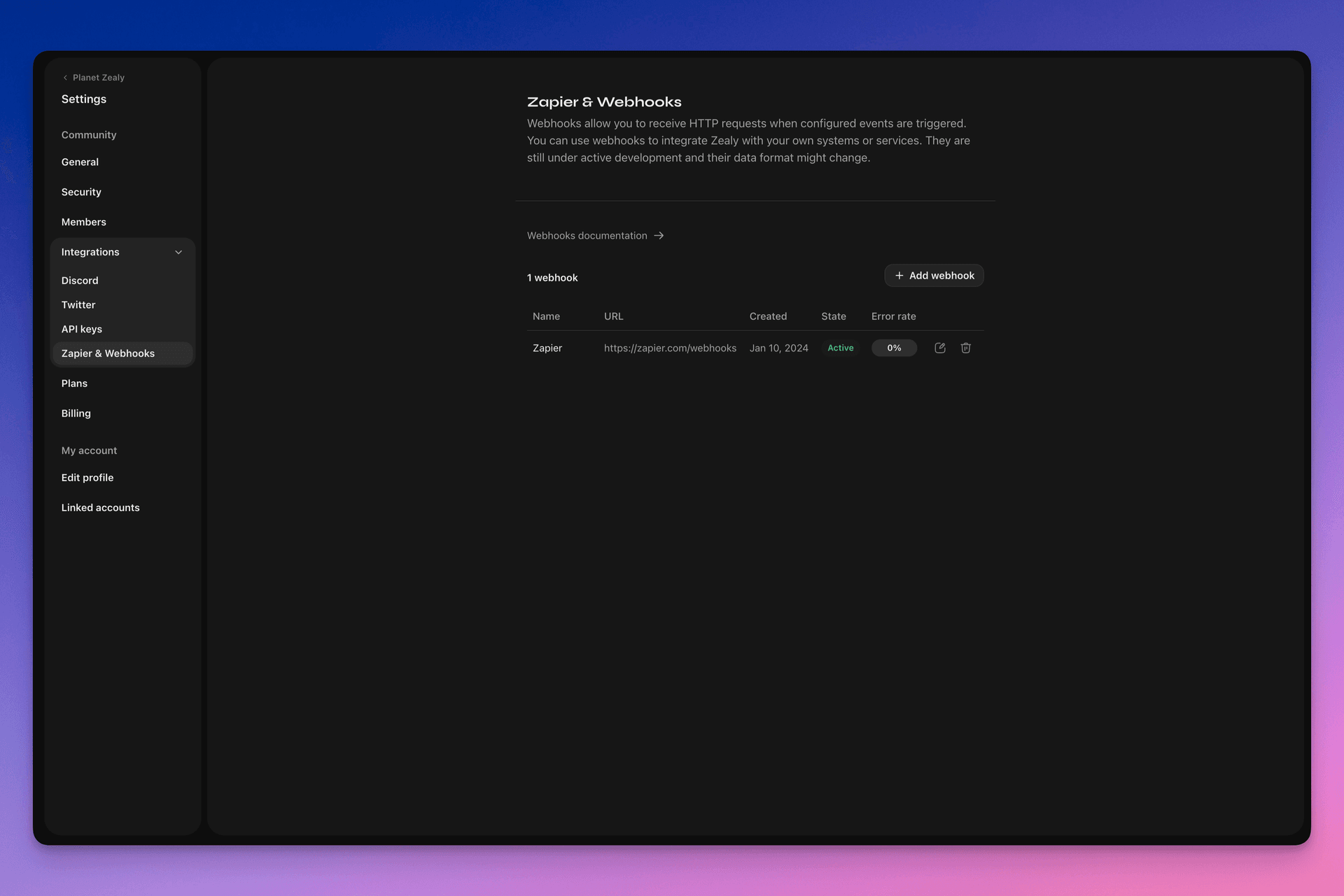
Te rugăm să accesezi Settings > Integrations > Zapier & Webhooks pentru a-ți configura webhook-urile.
Cum funcționează un Webhook?
Un push Webhook este pur și simplu o HTTP POST cerere, trimisă către URL-ul ales de tine. Push-ul este declanșat automat de Linear când datele se actualizează. Pentru un exemplu de date conținute într-un payload, vezi Payload-ul Webhook.
Consumatorul tău de webhook este un endpoint HTTP simplu. Trebuie să îndeplinească următoarele condiții:
- Este disponibil la un URL HTTPS accesibil public, care nu este localhost
- Va răspunde la push-ul Webhook Zealy (cerere HTTP POST) cu un
HTTP 200răspuns ("OK")
Dacă o livrare eșuează (de exemplu, serverul este indisponibil, răspunsul a durat mai mult de 5 secunde, corpul răspunsului a fost mai mare de 5000 de octeți sau a răspuns cu un cod de stare HTTP diferit de 200), push-ul va fi reîncercat de 15 ori. Aici se folosește o întârziere exponențială: încercarea va fi reluată după aproximativ 10 minute, apoi 30 de minute și așa mai departe. Dacă URL-ul webhook-ului continuă să nu răspundă, webhook-ul ar putea fi dezactivat de Zealy și trebuie reactivat manual.
Pentru a ne asigura că un Webhook POST este creat într-adevăr de Zealy, generăm un secret aleatoriu care va fi atașat corpului cererii în câmpul secret .
Pentru informații suplimentare despre Webhook-uri, există mai multe resurse utile:
- RequestBin: Webhooks – Ghidul definitiv
- requestbin.com este un instrument excelent pentru testarea webhook-urilor
- Ghid pentru dezvoltatori GitHub: Webhooks
La ce îl pot folosi?
- Integrează cu Zapier
- Automatizează recompensele personalizate
- Notifică pe Telegram questurile care așteaptă recenzii
Și mult, mult mai mult!
Primii pași cu Zealy Webhooks
- Identifică evenimentele pe care vrei să le monitorizezi.
- Dezvoltă o funcție de endpoint webhook pentru a primi cereri POST cu date despre evenimente.
- Înregistrează-ți endpointul în Zealy folosind panoul Webhooks din Settings > Integrations > Zapier & Webhooks.
- Securizează-ți endpointul webhook.
Crearea unui consumator simplu de Webhook
Ai putea lua în considerare utilizarea unor soluții precum Netlify Functions, care oferă o modalitate simplă de a implementa endpointuri HTTP(S) simple: https://www.netlify.com/blog/2018/09/13/how-to-run-express.js-apps-with-netlify-functions/.
// server.js
//
// Use this sample code to handle webhook events in your integration.
//
// 1) Paste this code into a new file (server.js)
//
// 2) Install dependencies
//   npm install express
//
// 3) Run the server on http://localhost:4242
//   node server.js

// The library needs to be configured with your account's secret key.
// Ensure the key is kept out of any version control system you might be using.
const express = require('express');
const app = express();

// This is your Zealy webhook secret for testing your endpoint locally.
const endpointSecret = '5888a6800dbac634e52d8504f097e064';

app.post('/webhook', express.raw({ type: 'application/json' }), (request, response) => {
  const payload = req.body;
  // Does createdAt make more sense than time?
  const { id, type, data, time, secret } = payload;

  if (secret === endpointSecret) {
    // Do something neat with the data received!
  }

  // Return a 200 response to acknowledge receipt of the event
  response.send();
});

app.listen(4242, () => console.log('Running on port 4242'));
Configurarea în setări
Configurează webhookul și evenimentele pe care trebuie să le monitorizeze în Settings > Integrations > Webhooks.
Payload-ul webhook-ului
Payload-ul HTTP al webhook-ului va include informații atât în antetele HTTP, cât și în corpul cererii.
Payload-ul va fi trimis cu următoarele antete HTTP:
User-Agent: Zealy-Webhook
Content-Type: application/json; charset=utf-8
{
  id: string // unique ID for this event (UUID v4)
  type: "JOINED_COMMUNITY" | "LEFT_COMMUNITY" | "QUEST_SUCCEEDED" | "QUEST_CLAIMED" | "QUEST_FAILED" | "QUEST_CLAIM_STATUS_UPDATED" | "SPRINT_STARTED" | "SPRINT_ENDED" | "USER_BANNED", // event type
  data: EventData, // event data, see below
  time: number, // timestamp, in milliseconds
  secret: string, // secret generated when you created your webhook, used for checking origin
}
Câmpul EventData pentru fiecare eveniment:
// JOINED_COMMUNITY
type JoinedCommunityEventData = {
  community: WebhookCommunityPayload;
  user: WebhookUserPayload;
};

// LEFT_COMMUNITY
type LeftCommunityEventData = {
  community: WebhookCommunityPayload;
  user: WebhookUserPayload;
};

// QUEST_SUCCEEDED
type QuestSucceededEventData = {
  community: WebhookCommunityPayload;
  user: WebhookUserPayload;
  quest: WebhookQuestPayload;
  taskInputs?: Array<{
    taskId: string, // task ID (uuid v4)
    taskType: 'number' | 'date' | 'api' | 'text' | 'discord' | 'url' | 'telegram' | 'quiz' | 'invites' | 'visitLink' | 'file' | 'poll' | 'opinion' | 'twitterFollow' | 'twitterSpace' | 'tweetReact' | 'tweet',
    input: WebhookQuestTaskInputPayload,
  }>;
  status: 'success';
};

// QUEST_CLAIMED
type QuestClaimedEventData = {
  community: WebhookCommunityPayload;
  user: WebhookUserPayload;
  quest: WebhookQuestPayload;
  taskInputs?: Array<{
    taskId: string, // task ID (uuid v4)
    taskType: 'number' | 'date' | 'api' | 'text' | 'discord' | 'url' | 'telegram' | 'quiz' | 'invites' | 'visitLink' | 'file' | 'poll' | 'opinion' | 'twitterFollow' | 'twitterSpace' | 'tweetReact' | 'tweet',
    input: WebhookQuestTaskInputPayload,
  }>;
};

// QUEST_FAILED
type QuestFailedEventData = {
  community: WebhookCommunityPayload;
  user: WebhookUserPayload;
  quest: WebhookQuestPayload;
  taskInputs?: Array<{
    taskId: string, // task ID (uuid v4)
    taskType: 'number' | 'date' | 'api' | 'text' | 'discord' | 'url' | 'telegram' | 'quiz' | 'invites' | 'visitLink' | 'file' | 'poll' | 'opinion' | 'twitterFollow' | 'twitterSpace' | 'tweetReact' | 'tweet',
    input: WebhookQuestTaskInputPayload,
  }>;
};

// QUEST_CLAIM_STATUS_UPDATED
type QuestClaimStatusUpdatedEventData = {
  community: WebhookCommunityPayload;
  user: WebhookUserPayload;
  quest: WebhookQuestPayload;
  taskInputs?: Array<{
    taskId: string, // task ID (uuid v4)
    taskType: 'number' | 'date' | 'api' | 'text' | 'discord' | 'url' | 'telegram' | 'quiz' | 'invites' | 'visitLink' | 'file' | 'poll' | 'opinion' | 'twitterFollow' | 'twitterSpace' | 'tweetReact' | 'tweet',
    input: WebhookQuestTaskInputPayload,
  }>;
  status: 'success' | 'pending' | 'failed';
};

// SPRINT_STARTED
type SprintStartedEventData = {
  community: WebhookCommunityPayload;
  sprint: WebhookSprintPayload;
};

// SPRINT_ENDED
type SprintEndedEventData = {
  community: WebhookCommunityPayload;
  sprint: WebhookSprintPayload;
};

// USER_BANNED
type UserBannedEventData = {
  community: WebhookCommunityPayload;
  user: WebhookUserPayload;
};
Entități comune:
type WebhookCommunityPayload = {
  id: string; // community ID (uuid V4)
  name: string; // community name
  subdomain: string; // community subdomain
  blockchain: string;
  discord: string | null; // discord URI of the community, e.g., https://discord.gg/zealy
  twitter: string | null; // twitter handle of the community, e.g., zealy_io
  website: string | null; // website URI of the community
};
type WebhookUserPayload = {
id: string; // user ID (uuid V4)
name: string | null; // user display name
twitter: {
id: string; // user twitter ID
username: string | null; // user twitter handle
} | null;
discord: {
id: string; // user discord ID
handle: string | null; // user discord handle
} | null;
email: string | null; // user email
addresses: Dict<string>; // key/value dictionary for wallets
verifiedAddresses: Dict<string>; // key/value dictionary for all users verified wallets
};type WebhookQuestPayload = {
id: string; // quest ID (uuid V4)
name: string; // quest display name
categoryId: string; // category ID (uuid V4)
categoryName: string | null; // category display name
xp: number | null; // XP reward
published: boolean | null; // true if quest is published, false otherwise
autoValidate: boolean | null;
tasks: TaskPayload[];
lastReviewerId: string; // user ID (uuid V4)
};type WebhookQuestTaskInputPayload =
| { } // for task type 'visitLink', 'invites', 'discord', 'telegram', 'twitterFollow', 'twitterSpace'
| { value: string } // for task type 'text', 'date', 'url', 'opinion'
| { value: number } // for task type 'number'
| { values: string[] } // for task type 'poll', 'quiz'
| { fileUrls: string[] } // for task type 'fileUrls'
| { tweetId?: string } // for task type 'tweetReact', 'tweet'
| { requestId: string, statusCode: number } // for task type 'api'type WebhookSprintPayload = {
id: string; // sprint ID (uuid V4)
startingAt: ISOString; // sprint starting date - https://developer.mozilla.org/en-US/docs/Web/JavaScript/Reference/Global_Objects/Date/toISOString
endingAt: ISOString; // sprint ending date
};Securizarea webhook-urilor
Crearea unui webhook va genera un secret aleatoriu pe care îl poți folosi pentru a verifica faptul că cererea provine din webhook-urile Zealy. Copiază secretul din colțul din dreapta sus al panoului de inspectare a webhook-ului și verifică dacă secretul setat în corpul cererii POST este identic.
În cazul în care secretul este divulgat, îl poți regenera din aceeași pagină.

Testarea webhook-urilor
Din panoul de inspectare al webhook-ului poți declanșa manual un eveniment de test. Click pe butonul din dreapta sus și selectează „Send test event”. Vei putea selecta un tip de eveniment dintre tipurile de evenimente monitorizate. Un eveniment va fi declanșat cu date simulate și starea va fi afișată.
Depanare
Poți vedea jurnalele tuturor evenimentelor trecute declanșate de webhook dacă dai click pe webhook din pagina Webhooks. Filtrând după stare, poți folosi jurnalele pentru a depana dacă ceva a mers greșit. Pentru fiecare eveniment, poți vedea mesajul de eroare primit și cererea care a fost trimisă.
De asemenea, poți reîncerca orice eveniment din această pagină.
