웹훅
웹훅 연결로 Zealy의 기능을 강화하세요.
작성자 louis, Fredrika, benjamin
이 페이지에서
Zealy 웹훅은 9가지 커뮤니티 이벤트(예: 멤버 가입, 퀘스트 클레임 성공 또는 실패, 스프린트 시작, 사용자 차단) 중 하나가 발생하면 지정한 URL로 HTTP POST를 전송합니다. 각 페이로드에는 이벤트 id, type, data, 밀리초 타임스탬프, 그리고 요청이 진짜임을 증명하는 secret이 포함됩니다.
기본 사항
Zealy는 웹훅 을 제공하여 데이터가 생성되거나 업데이트될 때마다 HTTP 푸시 알림을 받을 수 있습니다. 이를 통해 Zealy 위에 통합 기능을 구축할 수 있습니다. CI 빌드를 트리거하거나, 퀘스트 데이터로 계산을 수행하거나, 특정 조건에서 메시지를 보내는 등 무엇이든 가능합니다.
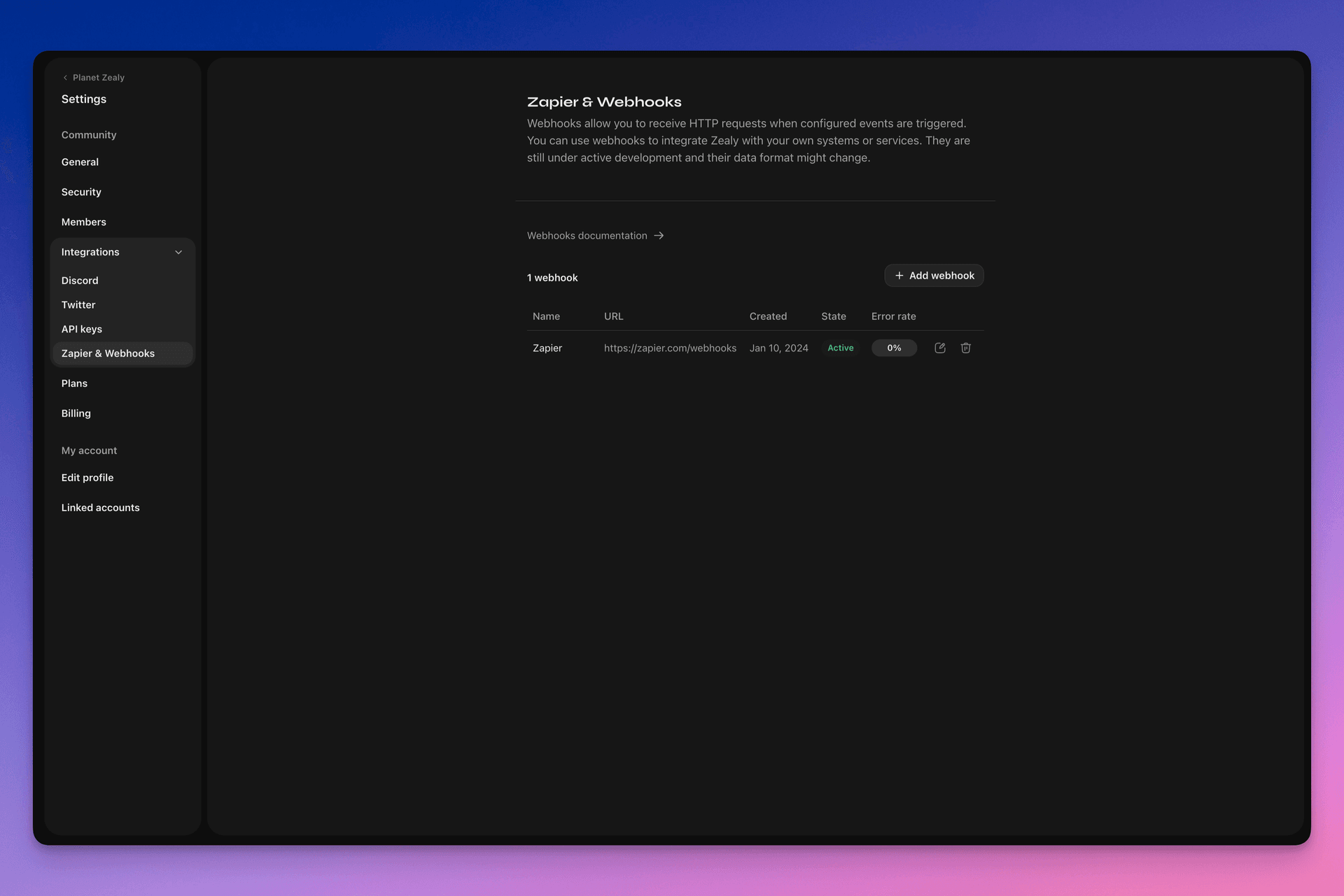
웹훅을 설정하려면 Settings > Integrations > Zapier & Webhooks로 이동하세요.
웹훅은 어떻게 작동하나요?
웹훅 푸시는 단순히 지정한 URL로 전송되는 HTTP POST 요청입니다. 푸시는 데이터가 업데이트될 때 자동으로 트리거됩니다. 페이로드에 어떤 데이터가 포함되는지 예시는 웹훅 페이로드.
웹훅 수신자는 단순한 HTTP 엔드포인트입니다. 다음 조건을 충족해야 합니다:
- 공개적으로 접근 가능한 HTTPS, localhost가 아닌 URL이어야 합니다
- Zealy 웹훅 푸시(HTTP POST 요청)에
HTTP 200("OK") 응답으로 응답해야 합니다
전송이 실패하면(예: 서버 사용 불가, 응답 시간이 5초 초과, 응답 본문이 5000바이트 초과, 또는 200이 아닌 HTTP 상태 코드로 응답), 푸시는 15번 재시도됩니다. 이때 지수 백오프 지연이 사용됩니다: 약 10분 후, 그다음 30분 후 등으로 재시도됩니다. 웹훅 URL이 계속 응답하지 않으면 Zealy가 웹훅을 비활성화할 수 있으며, 수동으로 다시 활성화해야 합니다.
웹훅 POST 이(가) 실제로 Zealy에 의해 생성되었는지 확인하기 위해, 요청 본문의 secret 필드에 첨부되는 무작위 secret을 생성합니다.
웹훅에 대한 추가 정보는 다음의 유용한 자료들을 참고하세요:
- RequestBin: Webhooks – The Definitive Guide
- requestbin.com 은 웹훅 테스트에 유용한 도구입니다
- GitHub Developer Guide: Webhooks
무엇에 사용할 수 있나요?
- Zapier와 통합
- 커스텀 보상 자동화
- 검토 대기 중인 퀘스트를 Telegram으로 알림
그리고 훨씬 더 많은 것들!
Zealy 웹훅 시작하기
- 모니터링할 이벤트를 식별합니다.
- 이벤트 데이터 POST 요청을 수신할 웹훅 엔드포인트 함수를 개발합니다.
- Settings > Integrations > Zapier & Webhooks의 Webhooks Dashboard를 사용하여 Zealy에 엔드포인트를 등록합니다.
- 웹훅 엔드포인트를 보호합니다.
간단한 웹훅 수신자 만들기
Netlify Functions 같은 것을 사용하면 간단한 HTTP(S) 엔드포인트를 배포하는 간단한 방법을 제공합니다: https://www.netlify.com/blog/2018/09/13/how-to-run-express.js-apps-with-netlify-functions/.
// server.js
//
// Use this sample code to handle webhook events in your integration.
//
// 1) Paste this code into a new file (server.js)
//
// 2) Install dependencies
//   npm install express
//
// 3) Run the server on http://localhost:4242
//   node server.js

// The library needs to be configured with your account's secret key.
// Ensure the key is kept out of any version control system you might be using.
const express = require('express');
const app = express();

// This is your Zealy webhook secret for testing your endpoint locally.
const endpointSecret = '5888a6800dbac634e52d8504f097e064';

app.post('/webhook', express.raw({ type: 'application/json' }), (request, response) => {
  const payload = req.body;
  // Does createdAt make more sense than time?
  const { id, type, data, time, secret } = payload;

  if (secret === endpointSecret) {
    // Do something neat with the data received!
  }

  // Return a 200 response to acknowledge receipt of the event
  response.send();
});

app.listen(4242, () => console.log('Running on port 4242'));
설정에서 구성하기
Settings > Integrations > Webhooks에서 웹훅과 모니터링할 이벤트를 설정하세요.
웹훅 페이로드
웹훅 HTTP 페이로드는 HTTP 헤더와 요청 본문 모두에 정보를 포함합니다.
페이로드는 다음 HTTP 헤더와 함께 전송됩니다:
User-Agent: Zealy-Webhook
Content-Type: application/json; charset=utf-8
{
  id: string // unique ID for this event (UUID v4)
  type: "JOINED_COMMUNITY" | "LEFT_COMMUNITY" | "QUEST_SUCCEEDED" | "QUEST_CLAIMED" | "QUEST_FAILED" | "QUEST_CLAIM_STATUS_UPDATED" | "SPRINT_STARTED" | "SPRINT_ENDED" | "USER_BANNED", // event type
  data: EventData, // event data, see below
  time: number, // timestamp, in milliseconds
  secret: string, // secret generated when you created your webhook, used for checking origin
}
이벤트별 EventData 필드:
// JOINED_COMMUNITY
type JoinedCommunityEventData = {
  community: WebhookCommunityPayload;
  user: WebhookUserPayload;
};

// LEFT_COMMUNITY
type LeftCommunityEventData = {
  community: WebhookCommunityPayload;
  user: WebhookUserPayload;
};

// QUEST_SUCCEEDED
type QuestSucceededEventData = {
  community: WebhookCommunityPayload;
  user: WebhookUserPayload;
  quest: WebhookQuestPayload;
  taskInputs?: Array<{
    taskId: string, // task ID (uuid v4)
    taskType: 'number' | 'date' | 'api' | 'text' | 'discord' | 'url' | 'telegram' | 'quiz' | 'invites' | 'visitLink' | 'file' | 'poll' | 'opinion' | 'twitterFollow' | 'twitterSpace' | 'tweetReact' | 'tweet',
    input: WebhookQuestTaskInputPayload,
  }>;
  status: 'success';
};

// QUEST_CLAIMED
type QuestClaimedEventData = {
  community: WebhookCommunityPayload;
  user: WebhookUserPayload;
  quest: WebhookQuestPayload;
  taskInputs?: Array<{
    taskId: string, // task ID (uuid v4)
    taskType: 'number' | 'date' | 'api' | 'text' | 'discord' | 'url' | 'telegram' | 'quiz' | 'invites' | 'visitLink' | 'file' | 'poll' | 'opinion' | 'twitterFollow' | 'twitterSpace' | 'tweetReact' | 'tweet',
    input: WebhookQuestTaskInputPayload,
  }>;
};

// QUEST_FAILED
type QuestFailedEventData = {
  community: WebhookCommunityPayload;
  user: WebhookUserPayload;
  quest: WebhookQuestPayload;
  taskInputs?: Array<{
    taskId: string, // task ID (uuid v4)
    taskType: 'number' | 'date' | 'api' | 'text' | 'discord' | 'url' | 'telegram' | 'quiz' | 'invites' | 'visitLink' | 'file' | 'poll' | 'opinion' | 'twitterFollow' | 'twitterSpace' | 'tweetReact' | 'tweet',
    input: WebhookQuestTaskInputPayload,
  }>;
};

// QUEST_CLAIM_STATUS_UPDATED
type QuestClaimStatusUpdatedEventData = {
  community: WebhookCommunityPayload;
  user: WebhookUserPayload;
  quest: WebhookQuestPayload;
  taskInputs?: Array<{
    taskId: string, // task ID (uuid v4)
    taskType: 'number' | 'date' | 'api' | 'text' | 'discord' | 'url' | 'telegram' | 'quiz' | 'invites' | 'visitLink' | 'file' | 'poll' | 'opinion' | 'twitterFollow' | 'twitterSpace' | 'tweetReact' | 'tweet',
    input: WebhookQuestTaskInputPayload,
  }>;
  status: 'success' | 'pending' | 'failed';
};

// SPRINT_STARTED
type SprintStartedEventData = {
  community: WebhookCommunityPayload;
  sprint: WebhookSprintPayload;
};

// SPRINT_ENDED
type SprintEndedEventData = {
  community: WebhookCommunityPayload;
  sprint: WebhookSprintPayload;
};

// USER_BANNED
type UserBannedEventData = {
  community: WebhookCommunityPayload;
  user: WebhookUserPayload;
};
공통 엔티티:
type WebhookCommunityPayload = {
  id: string; // community ID (uuid V4)
  name: string; // community name
  subdomain: string; // community subdomain
  blockchain: string;
  discord: string | null; // discord URI of the community, e.g., https://discord.gg/zealy
  twitter: string | null; // twitter handle of the community, e.g., zealy_io
  website: string | null; // website URI of the community
};
type WebhookUserPayload = {
id: string; // user ID (uuid V4)
name: string | null; // user display name
twitter: {
id: string; // user twitter ID
username: string | null; // user twitter handle
} | null;
discord: {
id: string; // user discord ID
handle: string | null; // user discord handle
} | null;
email: string | null; // user email
addresses: Dict<string>; // key/value dictionary for wallets
verifiedAddresses: Dict<string>; // key/value dictionary for all users verified wallets
};type WebhookQuestPayload = {
id: string; // quest ID (uuid V4)
name: string; // quest display name
categoryId: string; // category ID (uuid V4)
categoryName: string | null; // category display name
xp: number | null; // XP reward
published: boolean | null; // true if quest is published, false otherwise
autoValidate: boolean | null;
tasks: TaskPayload[];
lastReviewerId: string; // user ID (uuid V4)
};type WebhookQuestTaskInputPayload =
| { } // for task type 'visitLink', 'invites', 'discord', 'telegram', 'twitterFollow', 'twitterSpace'
| { value: string } // for task type 'text', 'date', 'url', 'opinion'
| { value: number } // for task type 'number'
| { values: string[] } // for task type 'poll', 'quiz'
| { fileUrls: string[] } // for task type 'fileUrls'
| { tweetId?: string } // for task type 'tweetReact', 'tweet'
| { requestId: string, statusCode: number } // for task type 'api'type WebhookSprintPayload = {
id: string; // sprint ID (uuid V4)
startingAt: ISOString; // sprint starting date - https://developer.mozilla.org/en-US/docs/Web/JavaScript/Reference/Global_Objects/Date/toISOString
endingAt: ISOString; // sprint ending date
};웹훅 보안
웹훅을 생성하면 요청이 Zealy 웹훅에서 오는지 확인하는 데 사용할 수 있는 무작위 secret이 생성됩니다. 웹훅 검사 패널 오른쪽 상단의 secret을 복사하고, POST 요청 본문에 설정된 secret이 동일한지 확인하세요.
secret이 유출된 경우 같은 페이지에서 재생성할 수 있습니다.

웹훅 테스트
웹훅의 검사 패널에서 수동으로 테스트 이벤트를 트리거할 수 있습니다. 오른쪽 상단의 버튼을 클릭하고 'Send test event'를 선택하세요. 모니터링되는 이벤트 유형 중에서 이벤트 유형을 선택할 수 있습니다. 모의 데이터로 이벤트가 트리거되고 상태가 표시됩니다.
디버깅
Webhooks 페이지에서 웹훅을 클릭하면 웹훅이 트리거한 모든 과거 이벤트의 로그를 볼 수 있습니다. 상태별로 필터링하여 문제가 발생했을 때 로그로 디버깅할 수 있습니다. 각 이벤트에 대해 수신된 오류 메시지와 전송된 요청을 볼 수 있습니다.
이 페이지에서 모든 이벤트를 재시도할 수도 있습니다.
