Mga Webhook
Palakasin ang mga Kakayahan ng Zealy gamit ang mga Koneksyon ng Webhook.
Ni louis, Fredrika, benjamin
Sa pahinang ito
Ang Zealy webhook ay nagpapadala ng HTTP POST sa isang URL na iyong pinili kapag may isa sa siyam na kaganapan ng komunidad na naganap, kabilang dito ang pagsali ng miyembro, pagtagumpay o pagkabigo ng claim ng quest, pagsisimula ng sprint, at pag-ban ng user. Ang bawat payload ay may event id, type, data, millisecond timestamp, at ang secret na nagpapatunay na tunay ang request.
Mga Batayan
Nagbibigay ang Zealy ng mga webhook na nagpapahintulot sa iyo na makatanggap ng mga HTTP push notification kapag may data na nilikha o na-update. Nagbibigay-daan ito sa iyo na bumuo ng mga integrasyon sa ibabaw ng Zealy. Maaari kang mag-trigger ng CI builds, magsagawa ng mga kalkulasyon sa data ng quest, o magpadala ng mga mensahe sa mga partikular na kondisyon – ikaw na ang bahala.
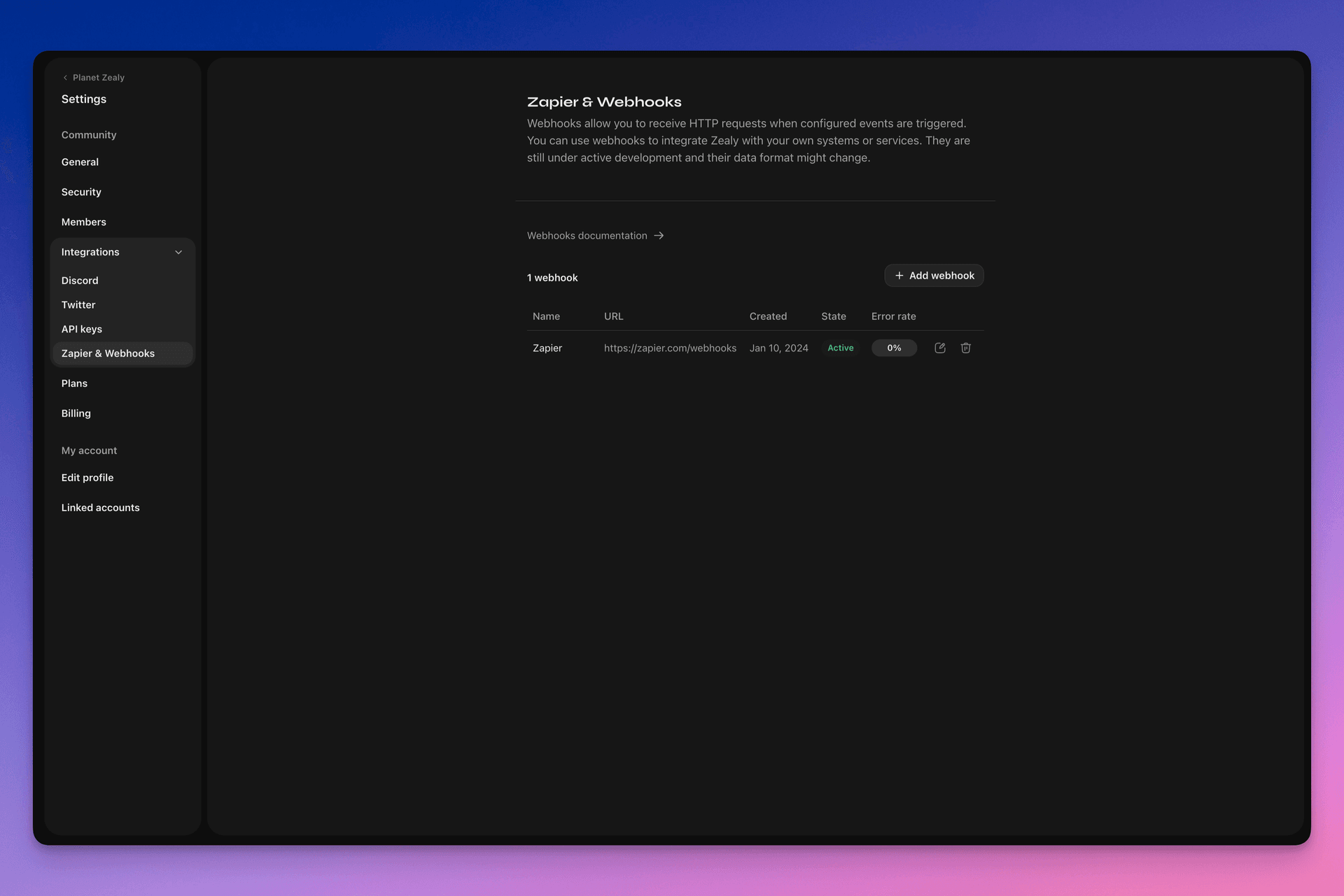
Pumunta sa Settings > Integrations > Zapier & Webhooks upang i-set up ang iyong mga webhook.
Paano gumagana ang isang Webhook?
Ang Webhook push ay isang HTTP POST request, na ipinapadala sa URL na iyong pinili. Awtomatikong na-trigger ang push ng Linear kapag may na-update na data. Para sa halimbawa ng data na nilalaman ng payload, tingnan ang Ang Webhook Payload.
Ang iyong webhook consumer ay isang simpleng HTTP endpoint. Dapat nitong matugunan ang mga sumusunod na kondisyon:
- Available ito sa isang pampublikong naa-access na HTTPS, hindi localhost na URL
- Tutugon ito sa Zealy Webhook push (HTTP POST request) gamit ang
HTTP 200("OK") na tugon
Kung mabigo ang isang delivery (hal. hindi available ang server, tumagal ng higit sa 5 segundo ang tugon, mas malaki sa 5000 bytes ang response body o tumugon gamit ang non-200 HTTP status code), muling susubukan ang push nang 15 beses. Gumagamit dito ng exponential backoff delay: muling susubukan ang pagtatangka pagkalipas ng humigit-kumulang 10 minuto, pagkatapos ay 30 minuto, at iba pa. Kung patuloy na hindi tumutugon ang webhook URL, maaaring i-disable ng Zealy ang webhook, at kailangan itong muling i-enable nang manu-mano.
Upang matiyak na ang Webhook POST ay tunay na nilikha ng Zealy, bumubuo kami ng random na secret na ikakabit sa body ng request sa secret field.
Para sa karagdagang impormasyon tungkol sa mga Webhook, may ilang mahusay na mapagkukunan:
- RequestBin: Webhooks – The Definitive Guide
- requestbin.com ay isang mahusay na tool para sa pagsubok ng mga webhook
- GitHub Developer Guide: Webhooks
Para saan ko ito magagamit?
- Mag-integrate sa Zapier
- I-automate ang mga custom na reward
- Abisuhan ang mga quest na naghihintay ng review sa Telegram
At marami pang iba!
Pagsisimula sa Zealy Webhooks
- Tukuyin kung aling mga kaganapan ang gusto mong subaybayan.
- Bumuo ng webhook endpoint function upang makatanggap ng mga POST request ng event data.
- Irehistro ang iyong endpoint sa loob ng Zealy gamit ang Webhooks Dashboard sa Settings > Integrations > Zapier & Webhooks.
- I-secure ang iyong webhook endpoint.
Paglikha ng simpleng Webhook consumer
Maaari mong isaalang-alang ang paggamit ng tulad ng Netlify Functions, na nagbibigay ng direktang paraan ng pag-deploy ng mga simpleng HTTP(S) endpoint: https://www.netlify.com/blog/2018/09/13/how-to-run-express.js-apps-with-netlify-functions/.
// server.js
//
// Use this sample code to handle webhook events in your integration.
//
// 1) Paste this code into a new file (server.js)
//
// 2) Install dependencies
//   npm install express
//
// 3) Run the server on http://localhost:4242
//   node server.js

// The library needs to be configured with your account's secret key.
// Ensure the key is kept out of any version control system you might be using.
const express = require('express');
const app = express();

// This is your Zealy webhook secret for testing your endpoint locally.
const endpointSecret = '5888a6800dbac634e52d8504f097e064';

app.post('/webhook', express.raw({ type: 'application/json' }), (request, response) => {
  const payload = req.body;
  // Does createdAt make more sense than time?
  const { id, type, data, time, secret } = payload;

  if (secret === endpointSecret) {
    // Do something neat with the data received!
  }

  // Return a 200 response to acknowledge receipt of the event
  response.send();
});

app.listen(4242, () => console.log('Running on port 4242'));
Pag-configure sa settings
I-set up ang webhook at ang mga kaganapang dapat nitong subaybayan sa Settings > Integrations > Webhooks.
Ang Webhook payload
Ang webhook HTTP payload ay magsasama ng impormasyon sa parehong HTTP headers at request body nito.
Ipapadala ang payload kasama ang mga sumusunod na HTTP header:
User-Agent: Zealy-Webhook
Content-Type: application/json; charset=utf-8
{
  id: string // unique ID for this event (UUID v4)
  type: "JOINED_COMMUNITY" | "LEFT_COMMUNITY" | "QUEST_SUCCEEDED" | "QUEST_CLAIMED" | "QUEST_FAILED" | "QUEST_CLAIM_STATUS_UPDATED" | "SPRINT_STARTED" | "SPRINT_ENDED" | "USER_BANNED", // event type
  data: EventData, // event data, see below
  time: number, // timestamp, in milliseconds
  secret: string, // secret generated when you created your webhook, used for checking origin
}
EventData field bawat kaganapan:
// JOINED_COMMUNITY
type JoinedCommunityEventData = {
  community: WebhookCommunityPayload;
  user: WebhookUserPayload;
};

// LEFT_COMMUNITY
type LeftCommunityEventData = {
  community: WebhookCommunityPayload;
  user: WebhookUserPayload;
};

// QUEST_SUCCEEDED
type QuestSucceededEventData = {
  community: WebhookCommunityPayload;
  user: WebhookUserPayload;
  quest: WebhookQuestPayload;
  taskInputs?: Array<{
    taskId: string, // task ID (uuid v4)
    taskType: 'number' | 'date' | 'api' | 'text' | 'discord' | 'url' | 'telegram' | 'quiz' | 'invites' | 'visitLink' | 'file' | 'poll' | 'opinion' | 'twitterFollow' | 'twitterSpace' | 'tweetReact' | 'tweet',
    input: WebhookQuestTaskInputPayload,
  }>;
  status: 'success';
};

// QUEST_CLAIMED
type QuestClaimedEventData = {
  community: WebhookCommunityPayload;
  user: WebhookUserPayload;
  quest: WebhookQuestPayload;
  taskInputs?: Array<{
    taskId: string, // task ID (uuid v4)
    taskType: 'number' | 'date' | 'api' | 'text' | 'discord' | 'url' | 'telegram' | 'quiz' | 'invites' | 'visitLink' | 'file' | 'poll' | 'opinion' | 'twitterFollow' | 'twitterSpace' | 'tweetReact' | 'tweet',
    input: WebhookQuestTaskInputPayload,
  }>;
};

// QUEST_FAILED
type QuestFailedEventData = {
  community: WebhookCommunityPayload;
  user: WebhookUserPayload;
  quest: WebhookQuestPayload;
  taskInputs?: Array<{
    taskId: string, // task ID (uuid v4)
    taskType: 'number' | 'date' | 'api' | 'text' | 'discord' | 'url' | 'telegram' | 'quiz' | 'invites' | 'visitLink' | 'file' | 'poll' | 'opinion' | 'twitterFollow' | 'twitterSpace' | 'tweetReact' | 'tweet',
    input: WebhookQuestTaskInputPayload,
  }>;
};

// QUEST_CLAIM_STATUS_UPDATED
type QuestClaimStatusUpdatedEventData = {
  community: WebhookCommunityPayload;
  user: WebhookUserPayload;
  quest: WebhookQuestPayload;
  taskInputs?: Array<{
    taskId: string, // task ID (uuid v4)
    taskType: 'number' | 'date' | 'api' | 'text' | 'discord' | 'url' | 'telegram' | 'quiz' | 'invites' | 'visitLink' | 'file' | 'poll' | 'opinion' | 'twitterFollow' | 'twitterSpace' | 'tweetReact' | 'tweet',
    input: WebhookQuestTaskInputPayload,
  }>;
  status: 'success' | 'pending' | 'failed';
};

// SPRINT_STARTED
type SprintStartedEventData = {
  community: WebhookCommunityPayload;
  sprint: WebhookSprintPayload;
};

// SPRINT_ENDED
type SprintEndedEventData = {
  community: WebhookCommunityPayload;
  sprint: WebhookSprintPayload;
};

// USER_BANNED
type UserBannedEventData = {
  community: WebhookCommunityPayload;
  user: WebhookUserPayload;
};
Mga karaniwang entity:
type WebhookCommunityPayload = {
  id: string; // community ID (uuid V4)
  name: string; // community name
  subdomain: string; // community subdomain
  blockchain: string;
  discord: string | null; // discord URI of the community, e.g., https://discord.gg/zealy
  twitter: string | null; // twitter handle of the community, e.g., zealy_io
  website: string | null; // website URI of the community
};
type WebhookUserPayload = {
id: string; // user ID (uuid V4)
name: string | null; // user display name
twitter: {
id: string; // user twitter ID
username: string | null; // user twitter handle
} | null;
discord: {
id: string; // user discord ID
handle: string | null; // user discord handle
} | null;
email: string | null; // user email
addresses: Dict<string>; // key/value dictionary for wallets
verifiedAddresses: Dict<string>; // key/value dictionary for all users verified wallets
};type WebhookQuestPayload = {
id: string; // quest ID (uuid V4)
name: string; // quest display name
categoryId: string; // category ID (uuid V4)
categoryName: string | null; // category display name
xp: number | null; // XP reward
published: boolean | null; // true if quest is published, false otherwise
autoValidate: boolean | null;
tasks: TaskPayload[];
lastReviewerId: string; // user ID (uuid V4)
};type WebhookQuestTaskInputPayload =
| { } // for task type 'visitLink', 'invites', 'discord', 'telegram', 'twitterFollow', 'twitterSpace'
| { value: string } // for task type 'text', 'date', 'url', 'opinion'
| { value: number } // for task type 'number'
| { values: string[] } // for task type 'poll', 'quiz'
| { fileUrls: string[] } // for task type 'fileUrls'
| { tweetId?: string } // for task type 'tweetReact', 'tweet'
| { requestId: string, statusCode: number } // for task type 'api'type WebhookSprintPayload = {
id: string; // sprint ID (uuid V4)
startingAt: ISOString; // sprint starting date - https://developer.mozilla.org/en-US/docs/Web/JavaScript/Reference/Global_Objects/Date/toISOString
endingAt: ISOString; // sprint ending date
};Pag-secure ng mga webhook
Ang paglikha ng webhook ay bubuo ng random na secret na magagamit mo upang i-verify na ang request ay nagmumula sa Zealy webhooks. Kopyahin ang secret sa kanang itaas ng webhook inspect panel at i-verify na ang secret na nakatakda sa body ng POST request ay pareho.
Kung sakaling ma-leak ang secret, maaari mo itong i-regenerate mula sa parehong pahina.

Pagsubok ng mga webhook
Mula sa inspect panel ng webhook, maaari kang manu-manong mag-trigger ng test event. I-click ang button sa kanang itaas at piliin ang 'Send test event'. Magagawa mong pumili ng uri ng kaganapan sa mga sinusubaybayang uri ng kaganapan. Mag-trigger ang isang kaganapan gamit ang mock data at ipapakita ang status.
Pag-debug
Makikita mo ang mga log ng lahat ng nakaraang kaganapang na-trigger ng webhook kung i-click mo ang webhook mula sa Webhooks page. Sa pag-filter ayon sa status, magagamit mo ang mga log upang i-debug kung may nangyaring mali. Para sa bawat kaganapan, makikita mo ang natanggap na error message at ang ipinadalang request.
Maaari mo ring muling subukan ang anumang kaganapan mula sa pahinang ito.
