Webhooks
عزّز قدرات Zealy باستخدام اتصالات Webhook.
بواسطة louis, Fredrika, benjamin
في هذه الصفحة
يرسل Webhook الخاص بـ Zealy طلب HTTP POST إلى عنوان URL تختاره عند حدوث أحد تسعة أحداث مجتمعية، منها انضمام عضو، أو نجاح أو فشل المطالبة بمهمة، أو بدء سبرنت، أو حظر مستخدم. يحمل كل حمولة معرّف حدث ونوعه وبياناته وطابعًا زمنيًا بالمللي ثانية والسر الذي يثبت أن الطلب أصلي.
الأساسيات
يوفر Zealy Webhooks التي تتيح لك تلقي إشعارات دفع HTTP كلما تم إنشاء بيانات أو تحديثها. يتيح لك ذلك بناء تكاملات فوق Zealy. يمكنك تشغيل عمليات بناء CI، أو إجراء حسابات على بيانات المهام، أو إرسال رسائل وفق شروط محددة – كل ما تسميه.
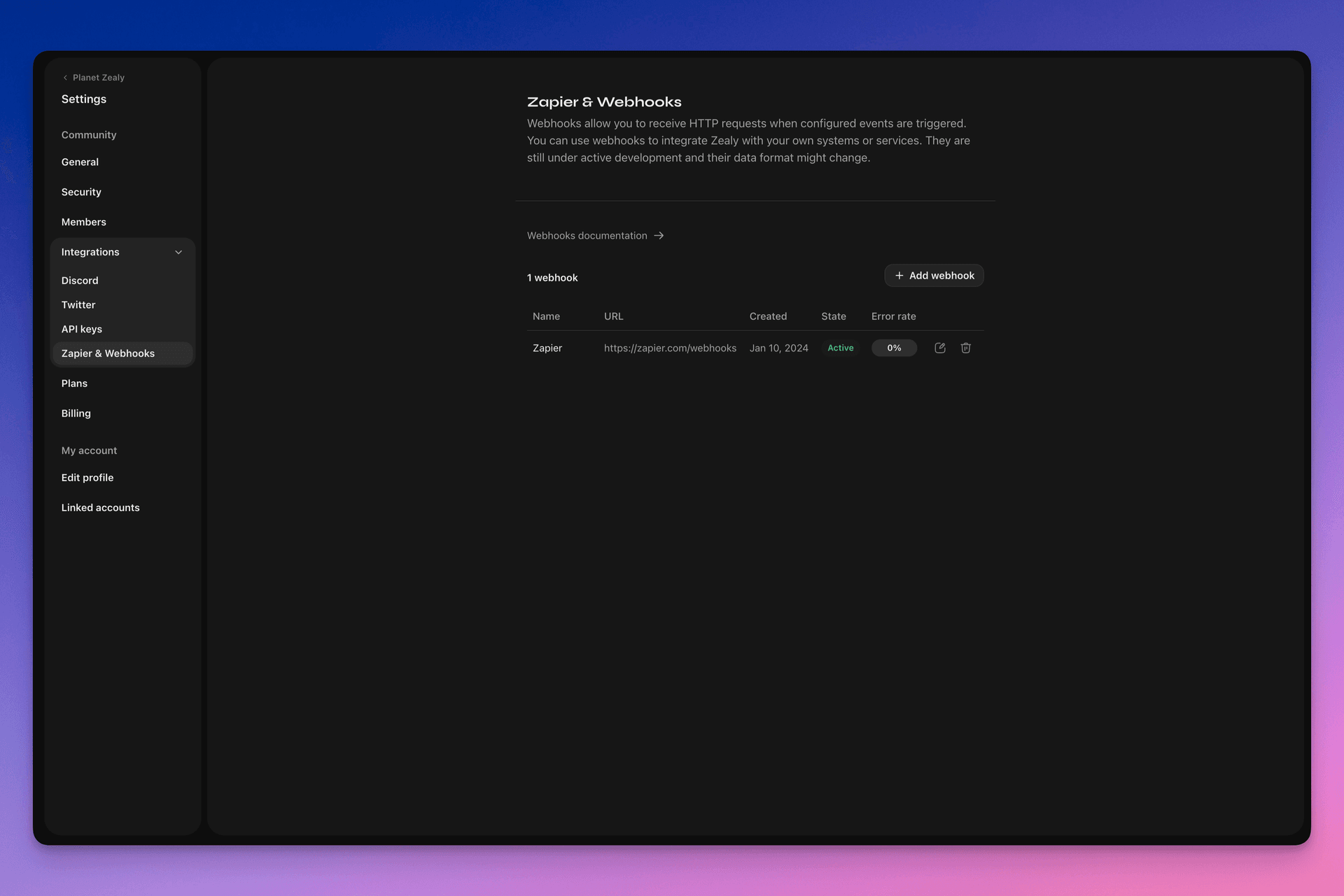
يرجى زيارة الإعدادات > التكاملات > Zapier & Webhooks لإعداد Webhooks الخاصة بك.
كيف يعمل Webhook؟
دفع Webhook هو ببساطة طلب HTTP POST يُرسل إلى عنوان URL الذي تختاره. يتم تشغيل الدفع تلقائيًا بواسطة Linear عند تحديث البيانات. للحصول على مثال لما تحتويه الحمولة من بيانات، راجع حمولة Webhook.
مستهلك Webhook الخاص بك هو نقطة نهاية HTTP بسيطة. يجب أن يستوفي الشروط التالية:
- أن يكون متاحًا على عنوان URL عام عبر HTTPS وليس localhost
- أن يستجيب لدفع Webhook الخاص بـ Zealy (طلب HTTP POST) باستجابة
HTTP 200("OK")
إذا فشل التسليم (أي أن الخادم غير متاح، أو استغرقت الاستجابة أكثر من 5 ثوانٍ، أو كان جسم الاستجابة أكبر من 5000 بايت، أو استجاب برمز حالة HTTP غير 200)، ستُعاد محاولة الدفع 15 مرة. يُستخدم هنا تأخير تراجعي أسي: ستُعاد المحاولة بعد حوالي 10 دقائق، ثم 30 دقيقة، وهكذا. إذا استمر عنوان URL الخاص بـ Webhook في عدم الاستجابة، فقد يعطّل Zealy الـ Webhook، ويجب إعادة تمكينه يدويًا.
للتأكد من أن Webhook POST تم إنشاؤه فعلاً بواسطة Zealy، ننشئ سرًا عشوائيًا يُرفق بجسم الطلب في حقل secret .
لمزيد من المعلومات حول Webhooks، هناك عدة مصادر جيدة:
- RequestBin: Webhooks – الدليل النهائي
- requestbin.com أداة رائعة لاختبار Webhooks
- دليل مطوري GitHub: Webhooks
فيم يمكنني استخدامه؟
- التكامل مع Zapier
- أتمتة المكافآت المخصصة
- إشعار المهام التي تنتظر المراجعة على Telegram
والمزيد الكثير!
البدء مع Zealy Webhooks
- حدد الأحداث التي تريد مراقبتها.
- طوّر دالة نقطة نهاية Webhook لتلقي طلبات POST لبيانات الأحداث.
- سجّل نقطة النهاية الخاصة بك داخل Zealy باستخدام لوحة Webhooks في الإعدادات > التكاملات > Zapier & Webhooks.
- أمّن نقطة نهاية Webhook الخاصة بك.
إنشاء مستهلك Webhook بسيط
قد تفكر في استخدام شيء مثل Netlify Functions، الذي يوفر طريقة مباشرة لنشر نقاط نهاية HTTP(S) بسيطة: https://www.netlify.com/blog/2018/09/13/how-to-run-express.js-apps-with-netlify-functions/.
// server.js
//
// Use this sample code to handle webhook events in your integration.
//
// 1) Paste this code into a new file (server.js)
//
// 2) Install dependencies
//   npm install express
//
// 3) Run the server on http://localhost:4242
//   node server.js

// The library needs to be configured with your account's secret key.
// Ensure the key is kept out of any version control system you might be using.
const express = require('express');
const app = express();

// This is your Zealy webhook secret for testing your endpoint locally.
const endpointSecret = '5888a6800dbac634e52d8504f097e064';

app.post('/webhook', express.raw({ type: 'application/json' }), (request, response) => {
  const payload = req.body;
  // Does createdAt make more sense than time?
  const { id, type, data, time, secret } = payload;

  if (secret === endpointSecret) {
    // Do something neat with the data received!
  }

  // Return a 200 response to acknowledge receipt of the event
  response.send();
});

app.listen(4242, () => console.log('Running on port 4242'));
التهيئة في الإعدادات
قم بإعداد Webhook والأحداث التي يجب أن يراقبها في الإعدادات > التكاملات > Webhooks.
حمولة Webhook
ستتضمن حمولة HTTP الخاصة بـ Webhook معلومات في رؤوس HTTP وجسم الطلب.
ستُرسل الحمولة مع رؤوس HTTP التالية:
User-Agent: Zealy-Webhook
Content-Type: application/json; charset=utf-8
{
  id: string // unique ID for this event (UUID v4)
  type: "JOINED_COMMUNITY" | "LEFT_COMMUNITY" | "QUEST_SUCCEEDED" | "QUEST_CLAIMED" | "QUEST_FAILED" | "QUEST_CLAIM_STATUS_UPDATED" | "SPRINT_STARTED" | "SPRINT_ENDED" | "USER_BANNED", // event type
  data: EventData, // event data, see below
  time: number, // timestamp, in milliseconds
  secret: string, // secret generated when you created your webhook, used for checking origin
}
حقل EventData لكل حدث:
// JOINED_COMMUNITY
type JoinedCommunityEventData = {
  community: WebhookCommunityPayload;
  user: WebhookUserPayload;
};

// LEFT_COMMUNITY
type LeftCommunityEventData = {
  community: WebhookCommunityPayload;
  user: WebhookUserPayload;
};

// QUEST_SUCCEEDED
type QuestSucceededEventData = {
  community: WebhookCommunityPayload;
  user: WebhookUserPayload;
  quest: WebhookQuestPayload;
  taskInputs?: Array<{
    taskId: string, // task ID (uuid v4)
    taskType: 'number' | 'date' | 'api' | 'text' | 'discord' | 'url' | 'telegram' | 'quiz' | 'invites' | 'visitLink' | 'file' | 'poll' | 'opinion' | 'twitterFollow' | 'twitterSpace' | 'tweetReact' | 'tweet',
    input: WebhookQuestTaskInputPayload,
  }>;
  status: 'success';
};

// QUEST_CLAIMED
type QuestClaimedEventData = {
  community: WebhookCommunityPayload;
  user: WebhookUserPayload;
  quest: WebhookQuestPayload;
  taskInputs?: Array<{
    taskId: string, // task ID (uuid v4)
    taskType: 'number' | 'date' | 'api' | 'text' | 'discord' | 'url' | 'telegram' | 'quiz' | 'invites' | 'visitLink' | 'file' | 'poll' | 'opinion' | 'twitterFollow' | 'twitterSpace' | 'tweetReact' | 'tweet',
    input: WebhookQuestTaskInputPayload,
  }>;
};

// QUEST_FAILED
type QuestFailedEventData = {
  community: WebhookCommunityPayload;
  user: WebhookUserPayload;
  quest: WebhookQuestPayload;
  taskInputs?: Array<{
    taskId: string, // task ID (uuid v4)
    taskType: 'number' | 'date' | 'api' | 'text' | 'discord' | 'url' | 'telegram' | 'quiz' | 'invites' | 'visitLink' | 'file' | 'poll' | 'opinion' | 'twitterFollow' | 'twitterSpace' | 'tweetReact' | 'tweet',
    input: WebhookQuestTaskInputPayload,
  }>;
};

// QUEST_CLAIM_STATUS_UPDATED
type QuestClaimStatusUpdatedEventData = {
  community: WebhookCommunityPayload;
  user: WebhookUserPayload;
  quest: WebhookQuestPayload;
  taskInputs?: Array<{
    taskId: string, // task ID (uuid v4)
    taskType: 'number' | 'date' | 'api' | 'text' | 'discord' | 'url' | 'telegram' | 'quiz' | 'invites' | 'visitLink' | 'file' | 'poll' | 'opinion' | 'twitterFollow' | 'twitterSpace' | 'tweetReact' | 'tweet',
    input: WebhookQuestTaskInputPayload,
  }>;
  status: 'success' | 'pending' | 'failed';
};

// SPRINT_STARTED
type SprintStartedEventData = {
  community: WebhookCommunityPayload;
  sprint: WebhookSprintPayload;
};

// SPRINT_ENDED
type SprintEndedEventData = {
  community: WebhookCommunityPayload;
  sprint: WebhookSprintPayload;
};

// USER_BANNED
type UserBannedEventData = {
  community: WebhookCommunityPayload;
  user: WebhookUserPayload;
};
الكيانات الشائعة:
type WebhookCommunityPayload = {
  id: string; // community ID (uuid V4)
  name: string; // community name
  subdomain: string; // community subdomain
  blockchain: string;
  discord: string | null; // discord URI of the community, e.g., https://discord.gg/zealy
  twitter: string | null; // twitter handle of the community, e.g., zealy_io
  website: string | null; // website URI of the community
};
type WebhookUserPayload = {
id: string; // user ID (uuid V4)
name: string | null; // user display name
twitter: {
id: string; // user twitter ID
username: string | null; // user twitter handle
} | null;
discord: {
id: string; // user discord ID
handle: string | null; // user discord handle
} | null;
email: string | null; // user email
addresses: Dict<string>; // key/value dictionary for wallets
verifiedAddresses: Dict<string>; // key/value dictionary for all users verified wallets
};type WebhookQuestPayload = {
id: string; // quest ID (uuid V4)
name: string; // quest display name
categoryId: string; // category ID (uuid V4)
categoryName: string | null; // category display name
xp: number | null; // XP reward
published: boolean | null; // true if quest is published, false otherwise
autoValidate: boolean | null;
tasks: TaskPayload[];
lastReviewerId: string; // user ID (uuid V4)
};type WebhookQuestTaskInputPayload =
| { } // for task type 'visitLink', 'invites', 'discord', 'telegram', 'twitterFollow', 'twitterSpace'
| { value: string } // for task type 'text', 'date', 'url', 'opinion'
| { value: number } // for task type 'number'
| { values: string[] } // for task type 'poll', 'quiz'
| { fileUrls: string[] } // for task type 'fileUrls'
| { tweetId?: string } // for task type 'tweetReact', 'tweet'
| { requestId: string, statusCode: number } // for task type 'api'type WebhookSprintPayload = {
id: string; // sprint ID (uuid V4)
startingAt: ISOString; // sprint starting date - https://developer.mozilla.org/en-US/docs/Web/JavaScript/Reference/Global_Objects/Date/toISOString
endingAt: ISOString; // sprint ending date
};تأمين Webhooks
سيؤدي إنشاء Webhook إلى إنشاء سر عشوائي يمكنك استخدامه للتحقق من أن الطلب قادم من Webhooks الخاصة بـ Zealy. انسخ السر من أعلى يمين لوحة فحص Webhook وتحقق من أن السر المحدد في جسم طلب POST هو نفسه.
في حال تسرب السر، يمكنك إعادة إنشائه من نفس الصفحة.

اختبار Webhooks
من لوحة فحص Webhook يمكنك تشغيل حدث اختباري يدويًا. انقر على الزر في أعلى اليمين واختر 'إرسال حدث اختباري'. ستتمكن من اختيار نوع حدث من بين أنواع الأحداث المراقبة. سيتم تشغيل حدث ببيانات وهمية وعرض الحالة.
تصحيح الأخطاء
يمكنك رؤية سجلات جميع الأحداث السابقة التي شغلها Webhook إذا نقرت على Webhook من صفحة Webhooks. بالتصفية حسب الحالة يمكنك استخدام السجلات لتصحيح الأخطاء إذا حدث خطأ ما. لكل حدث، يمكنك رؤية رسالة الخطأ المستلمة والطلب الذي تم إرساله.
يمكنك أيضًا إعادة محاولة أي حدث من هذه الصفحة.
